Free Laptops for Low-Income Families: 14 Real Programs and What They Actually Cost (2026)

Almost every “free laptop” list on the internet is out of date, and several of the organisations on those lists either charge money, take computers instead of giving them, or no longer exist. We checked every programme in this guide against its own website on 9 September 2026 — not against another blog — and the honest picture is narrower and stranger than the listicles suggest.
Here is the summary before the detail. There is currently no federal programme a low-income household can apply to for a free or subsidised computer. The one that existed — the Affordable Connectivity Program’s $100 device discount — ended on 1 June 2024 and was never replaced. The state grants that funded a lot of local device giveaways were terminated on 9 May 2025. What is left is a patchwork of nonprofits, school districts, public libraries, disability programmes and one internet provider, and most of them charge somewhere between $40 and $260.
That is not a reason to give up. Several of these routes are genuinely excellent, and two of them will put a working computer in your house for nothing. But you will waste weeks if you start with the wrong list.
The short version: what is actually free, and what costs money
Sorted by what a household actually pays. Prices and statuses below were read from each organisation’s own page on 9 September 2026.
| Route | What you get | What it costs you | Who qualifies |
|---|---|---|---|
| Compudopt | Refurbished computer | Free (lottery) | No working home computer; 24 states |
| The On It Foundation | Computer + STEM programming | Free | K–12 on free/reduced lunch |
| Kramden Tech Scholars | Desktop running Ubuntu | Free (pickup in Durham) | K–12 in North Carolina, nominated |
| Computers with Causes | Refurbished computer | Free, no guarantee | Students, elderly, veterans, shelters |
| Your school district | Take-home Chromebook or laptop | Free (you owe for damage) | Enrolled students in 1:1 districts |
| Your public library | Laptop and/or hotspot loan | Free | Library card in good standing |
| Your college library | Semester-long laptop loan | Free | Enrolled students |
| State AT Act programme | Device loan or keep-it reuse | Free | Residents with disabilities |
| Kramden (adults) | Windows 11 desktop or laptop | $40 – $70 | Below 200% FPL, North Carolina only |
| human-I-T | Chromebook / Windows / Apple | from $89.99 | Below 200% FPL or on benefits |
| E2D | Refurbished laptop | $100 | Families with demonstrated need |
| PCs for People | Refurbished laptop or desktop | roughly $125 – $140 | Below 200% FPG or 60% AMI |
| Tech For Troops | Refurbished computer, ships | free or low cost — ask | Veterans, Guard, transitioning active duty |
| Comcast Internet Essentials | New Dell laptop or Chromebook | $149.99 + tax | Internet Essentials customers only |
And the routes that will not get you a computer, no matter how many articles say otherwise: Lifeline, E-Rate, Dell Reconnect, T-Mobile Project 10Million, Google, Apple, The Salvation Army, Operation Homefront and Vets Who Code. Each is explained further down, because knowing why saves you the application.
The federal route is closed, and this is the part most guides get wrong
If you have read that there is a government programme for a free laptop, you have read something that was true in 2023.
The Affordable Connectivity Program ended on 1 June 2024
The ACP was the only federal benefit that ever put money toward a household’s own computer. The Universal Service Administrative Company, which ran it, states plainly: “The ACP ended on June 1, 2024, due to a lack of additional funding from Congress.” The device benefit it carried was “a one-time device discount of up to $100 for a laptop, desktop computer, or tablet purchased through a participating provider”, and households had to contribute more than $10 and less than $50 toward the purchase price themselves.
The FCC’s consumer FAQ says the same thing and adds that April 2024 was the last month households received the full discount. There is no successor programme. The FCC points ACP households toward Lifeline while warning that “not all ACP recipients will qualify for Lifeline” — and Lifeline, as below, does not buy computers.
Lifeline is alive, but it is a service discount, not a device
Lifeline is still running in 2026 and it is worth having. It provides “a monthly discount of up to $9.25 on phone, internet, or bundled service”, rising to “up to $34.25” for households on qualifying Tribal lands. You qualify if your “income is 135% or less than the Federal Poverty Guidelines”, or through SNAP, Medicaid, SSI, Federal Public Housing Assistance, or the Veterans Pension and Survivors Benefit.
What Lifeline does not do is pay for hardware. Neither USAC’s Lifeline pages nor lifelinesupport.org describes any device benefit. Some carriers hand out a free phone as their own business decision; that is the carrier’s offer, not the Lifeline benefit, and it has never covered laptops. Apply at lifelinesupport.org or call (800) 234-9473.
E-Rate has never funded a student’s laptop
E-Rate is frequently cited in “free laptop” articles by people who have not read the eligible services list. USAC is explicit that E-Rate Category One “cannot include charges for content, end-user devices or equipment purchases”. E-Rate pays for broadband to school and library buildings, and for internal connections inside them — access points, routers, switches, wiring. It does not buy take-home devices and never has.
The related Wi-Fi hotspot lending rule adopted in July 2024 is also gone. The Federal Communications Commission published a partial withdrawal in the Federal Register reconsidering “the E-Rate Wi-Fi hotspot and services rules adopted in July 2024”, effective 20 February 2026, on the reasoning that the statute supports service provided to schools and libraries as locations rather than off-premises residential use. Separately, the Senate passed a Congressional Review Act resolution against that rule on 8 May 2025.
The Emergency Connectivity Fund did buy laptops — and it is over
This is the programme people are actually remembering. The ECF was a $7.17 billion fund created by the American Rescue Plan Act, and its eligible equipment list explicitly included “Laptop and tablet computers”, hotspots, modems and routers, reimbursed at up to $400 per laptop or tablet and $250 per hotspot.
Two things about it matter now. First, it reimbursed schools and libraries, which then lent devices out — it was never a household application. Second, it has wound down; USAC has discontinued phone support for it and its key-dates page reads “There are no upcoming dates at this time.”
You can watch the consequence in real time. Brooklyn Public Library ran an ECF-funded programme lending a laptop and hotspot to any borrower over 18 with a card, an ID and an orientation session, across nine locations. Its page now reads: “This program is no longer available. All borrowed devices must be returned to a participating location.”
The Digital Equity Act grants were terminated on 9 May 2025
This is the least reported and most consequential change, because state Digital Equity money was what funded a great many local device giveaways.
Three state agencies describe the same day in their own words. The California Department of Technology: “On May 9, 2025, the California Department of Technology received formal notification from the Trump Administration that funding for the $70 million State Digital Equity Capacity Grant award was immediately terminated.” The Pennsylvania Broadband Development Authority: “Program activities were required to cease immediately, and no further federal funds would be reimbursed under the grant.” The North Carolina Department of Information Technology: “On Friday, May 9, the National Telecommunications and Information Administration terminated North Carolina’s $22.4 million Digital Equity Capacity grant.”
North Carolina is the clearest example of what that meant on the ground: its $17 million Digital Opportunity grant, designed specifically to distribute computers and digital-skills training to residents, was cancelled as a direct result.
One piece of Digital Equity Act money is live again, and it is narrow. NTIA issued a 2026 Native Entities Grant Program notice of funding opportunity (2026-NTIA-NEGP) setting aside no less than $250,000,000 for Indian Tribes, Alaska Native entities and Native Hawaiian organisations, with applications due 17 September 2026. It can fund device distribution — with training requirements, no smartphones, and generally one device per household. It is a grant to organisations, not an application route for a family.
A practical warning: NTIA’s own Digital Equity Act pages have not been updated to reflect any of this. The news feed’s most recent item is from January 2025, several programme pages 404, and others still describe the programmes in the present tense. Do not use ntia.gov to check whether a programme is alive.
The four programmes that actually give a computer away for nothing
These are the ones worth applying to first. All four are free to the recipient. None of them guarantees you a machine, and all four are honest about that on their own pages.
Compudopt — free, 24 states, and the application takes four minutes
Compudopt is a Houston-headquartered nonprofit that runs scheduled computer giveaways in cities across 24 states: Arizona, California, Colorado, DC, Florida, Georgia, Illinois, Indiana, Iowa, Kansas, Kentucky, Louisiana, Michigan, Mississippi, Missouri, Nevada, Ohio, Oklahoma, Pennsylvania, Tennessee, Texas, Utah, Virginia and Washington.
Eligibility is one sentence, and it is unusually simple: “To qualify, you must not have access to a working computer at home, not including devices provided by school or work.” There is no income document and no benefit-programme test.
How it works. You choose your city from Compudopt’s list, complete a short registration form, and wait. In Compudopt’s own words: “Names will be chosen randomly three days before distribution dates,” and “If selected, you will receive an email and/or text message with instructions on where and when to pick up your free computer!”
The caveat is printed on their page and you should take it seriously: “Registration does not guarantee that you will receive a computer or that a distribution will be scheduled in your area immediately.” Giveaways are limited to the continental United States. Register once and leave the registration standing — the cost of applying is a few minutes, and the cost of not applying is that you are never in the draw.
Start at compudopt.org/computergiveaway.
The On It Foundation — free computers for K–12 students on free or reduced lunch
The On It Foundation is a Miami-based nonprofit providing free computers alongside STEM education to K–12 students. Its eligibility line covers “low-income families with students in grades K-12 who receive a free or reduced school lunch, attend a public/home school, and reside in the United States.”
Two honest notes. First, the correct web address is theonitfoundation.org — a shorter version of the name circulates widely in other articles and does not resolve. Second, the foundation’s site does not publish what kind of machine you receive, whether it is refurbished, or how long the wait is, so treat those as unknown rather than assuming a laptop. Applications route through its “Get On It Now” portal.
Kramden Institute Tech Scholars — free desktops for North Carolina students
Kramden Institute in Durham is one of the best-run refurbishers in the country and one of the most frequently misdescribed. Its free programme, Tech Scholars, gives K–12 students a free desktop computer running Ubuntu, an open-source operating system — not Windows, and not a laptop.
Requirements: the student must be in grades K–12, “must not have consistent access to a working home computer”, and is “nominated by a parent or educator.” There is “one computer per household unless special circumstances apply.” Typical wait is two to four weeks.
The two constraints that disqualify most readers: “Due to high demand, we currently only provide devices to individuals an organizations in North Carolina,” and “computers must be picked up from the Kramden office in Durham, NC. Kramden is not able to ship computers.” If you are outside North Carolina, or cannot get to Durham, this is not your route.
Computers with Causes — free, national, and genuinely uncertain
Computers with Causes is a programme of Giving Center (EIN 92-1162407) that ships refurbished computers, laptops and tablets to “students, teachers, and parents, the elderly, foster homes, shelters, disabled US veterans and struggling military families, and like-minded nonprofit organizations.” There is no published income threshold and no benefit test.
The application is old-fashioned: download the individual application form, “Print the form, sign it, and mail it to the address provided.” Then wait. Their own wording sets expectations better than we could: “After the application is received, we will review the information provided, then review our inventory, and if we are able to assist you then you will be contacted within 30 days,” and “All applications are valid for 30 days, so if you do not hear from us within that time frame then you can apply again.”
Two things their site does not say, and we are not going to guess at: whether recipients pay shipping, and what the realistic success rate is. One thing it does say, which is worth reading if you are on benefits: they warn that accepting “tangible property, gifts, financial assistance or services (additional income) may affect or terminate your current benefits” for households on TANF, SSI, SSDI or SNAP. That warning is unusual and, in our view, to their credit.
The free routes most people already qualify for and never use
Before you apply anywhere, check these. They are free, they are local, and the qualifying test is usually just enrolment or a library card.
Your school district may already owe your child a laptop
If your child’s district runs a 1:1 device programme, the machine is not a charity application — it is a form in the parent portal that many families never open.
Broward County Public Schools, the sixth-largest district in the country, is a clean example of the pattern. Its programme “provides eligible K–12 students with a district-issued take-home device to support learning anytime, anywhere,” and students “can use their laptop for educational purposes both at school and at home.” Getting one means opening the 1:1 Device Issuance Agreement in the Focus parent portal, choosing your language, agreeing to the terms, indicating opt-in, and signing electronically. Agreement forms are published in English, Spanish, Haitian Creole and Portuguese.
The catch to read before signing: “Financial responsibility applies for damage or failure to return the laptop in issued condition,” with stated replacement costs from $318.48 to $522.48 depending on grade band. For a device that is broken or never issued, the district’s instruction is to contact the school office directly, not a central department.
Every 1:1 district works slightly differently — some issue iPads in the youngest grades and Chromebooks above, and some handle replacements by help-desk ticket. Call your school office and ask two questions: does the district issue take-home devices, and where is the agreement form.
College and community-college libraries lend laptops by the semester
This one is badly underused. Two verified examples show the shape of it.
Fullerton College’s library runs a Laptop Semester Loan Program: “Laptop loans are free of charge as long as they are returned to the library at the end of the semester in good shape.” Students must be enrolled in at least nine units and bring a valid student ID with proof of current enrolment; you sign the agreement at the Circulation Desk on the first floor. Notably, a student registered with Disability Support Services can borrow with fewer than nine units on an authorised waiver.
California State University, Northridge runs a Device Loaner Program offering “laptops, tablets, and hotspots” on “semester-long loans with a one semester renewal option,” at no cost to enrolled students with no outstanding library fees. You book a pickup appointment first, and their own caution applies everywhere: “Creating an appointment does NOT guarantee availability for your desired device.”
If you are enrolled anywhere — including a single community-college course — check your library’s technology page before you spend $150 on a refurbished machine.
Public libraries: real, free, and shrinking
Library device lending is the most reliable free route in the country and also the most uneven, because a lot of it was funded by the Emergency Connectivity Fund and has been switching off since that money ended.
What good looks like: Los Angeles Public Library’s Tech2go lends “Computer Bundles” pairing a Chromebook with an internet hotspot, plus standalone Chromebooks, mobile hotspots, iFixit repair kits and mobile computer labs. Chromebooks and hotspots are “available for long-term use.” Eligibility is one line: “Tech2go items are available to adults with a library card in good standing.”
Seattle Public Library lends hotspots on 21-day checkouts — “Anyone who has a Library card can borrow a free hotspot” — with the frank warning that “there is often a very long waiting list.” The device stops working within 24 hours of the due date, so treat the return date as real.
What bad looks like is Brooklyn Public Library, quoted earlier: an excellent laptop-and-hotspot programme that no longer exists. Check your own library system’s current page rather than a list, because the list is probably describing a programme that closed.
If you or someone in your household has a disability, start with your state AT programme
This is the strongest route in the guide and virtually nobody outside the disability community knows about it. Every US state and territory has an Assistive Technology Act programme funded through the Administration for Community Living, and computer access is one of the categories they cover. They run device loans, device demonstrations and device reutilisation — the last of which means you keep the equipment.
Oklahoma ABLE Tech is the best-documented example. Its loan library holds “nearly 5,000 devices in many AT categories, including devices and equipment for speech communication, computer access, hearing, vision” and more, on loans of up to six weeks, up to three devices at a time. Cost: “There is no fee to borrow an item from the Device Loan Program.” Eligibility: “Available to all Oklahoma residents with disabilities, their family members, and the professionals that support them.” Its separate reutilisation programme lets you “Receive gently used AT devices and durable medical equipment to use for as long as you need,” and is open to “Any Oklahoman who is in need of medical equipment or devices, regardless of income.”
Pennsylvania’s programme, TechOWL at Temple University, describes a lending library of “over 1500 devices that anyone in the Commonwealth of Pennsylvania can use”, free 3D-printed assistive devices, a special-phone programme, and a Del Sordo Fund grant of up to $400 toward equipment.
The honest limit: reuse inventories in both states skew heavily toward durable medical equipment — walkers, wheelchairs, shower chairs — and neither reuse page names computers specifically. The device loan libraries do include computer access technology. So the realistic ask is a loan, a demonstration, or a referral, not a guaranteed free laptop.
Find your state’s programme through the AT3 Center’s directory at at3center.net/state-at-programs, which lists every state and territory with its phone number and which of the five services it runs.
The low-cost route: $40 to $150 for a machine that actually works
If the free routes do not land, this is where most families end up, and there is no shame in it. A $125 refurbished business laptop with a one-year warranty is a better outcome than a two-year wait for a free one.
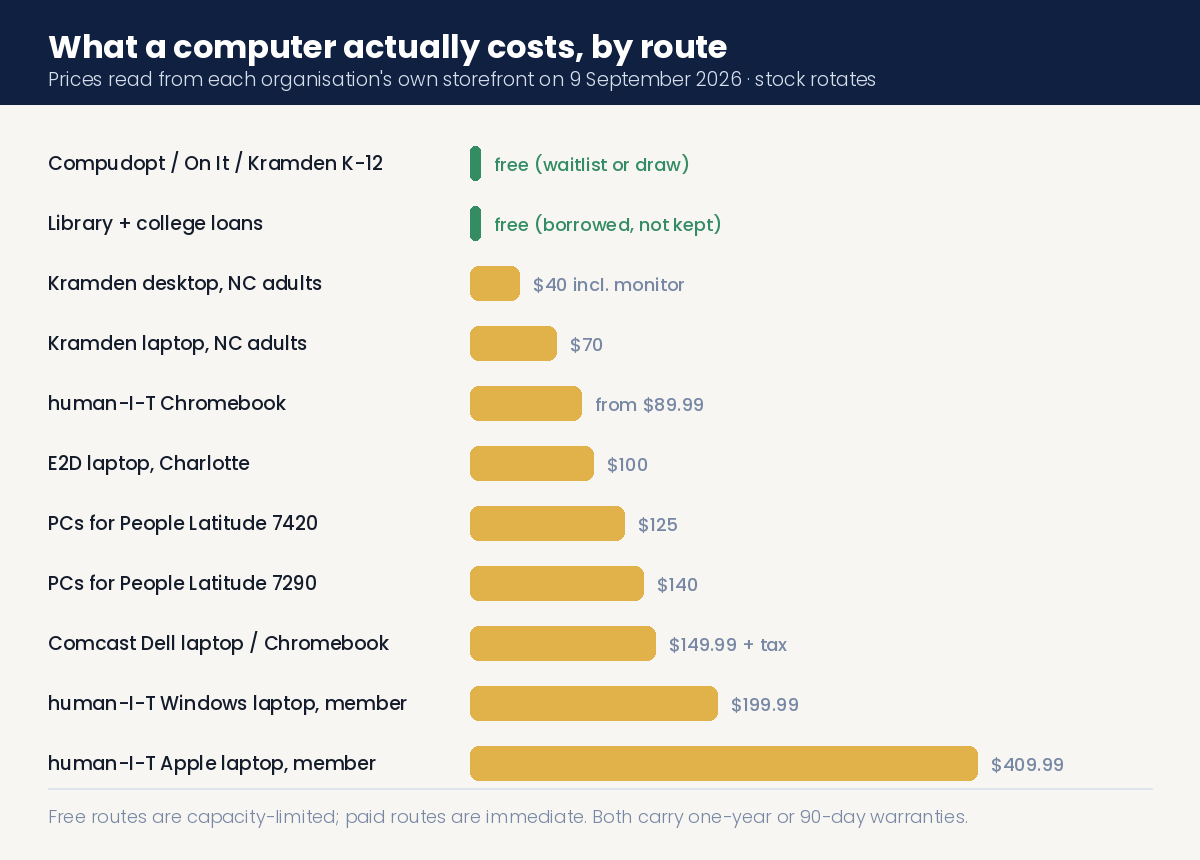
A note on prices before the list: refurbisher stock rotates constantly. The figures below are what the organisations’ own storefronts showed on 9 September 2026. Treat them as the shape of the pricing, not a price list.
PCs for People — nationwide, income-tested, roughly $125–$140 for a laptop
PCs for People is the largest nonprofit refurbisher in the country. Its own figure: “Since 1998, PCs for People has provided over 190,000 computers to people across the country.” It sells refurbished desktops and laptops, ships nationally, and also sells low-cost internet service from about $15 a month with no credit check.
What it costs. On the day we checked, its store listed a Dell Latitude 7420 with an i5-1135G7 running Windows 11 at $125.00, and an upgraded Dell Latitude 7290 with an i7-8650U at $140.00. Shipping is included for orders within the contiguous US, and the store advertises a 30-day return policy and a one-year hardware warranty.
Who qualifies. You need “a qualifying household income (less than 200% of federal poverty guidelines…or 60% of area median income)”, or participation in a government assistance programme. Accepted proof includes SNAP, WIC, Medicaid, TANF, LIHEAP, Section 8, SSI, SSD, a Federal Pell Grant or free/reduced lunch. Documents “must include your full name and be dated within the last 12 months”, handwritten documents are not accepted, and you need photo ID. Proof of citizenship is not required.
How to apply. Gather photo ID plus one dated income document, then upload it when you place your order at the PCs for People store, or email it in advance. Orders ship anywhere in the contiguous US except PO boxes; Alaska, Hawaii and Puerto Rico are excluded. It also runs physical locations in Atlanta, Baltimore, Chicago (Cook County), Cleveland, Denver, Hampton VA, Kansas City, Mankato MN, Philadelphia, St. Louis, St. Paul and Seattle.
human-I-T — Chromebooks from $89.99, member pricing for qualified households
human-I-T is a social enterprise selling refurbished Chromebooks, Windows laptops, Apple laptops, tablets and desktops, with a second income-qualified price tier it calls Gold Member pricing. On the day we checked, its advertised entry point was Chromebooks “as Low as $89.99”, with Windows laptops at $259.99 regular / $199.99 member, a Pro Windows laptop at $309.99 / $249.99, an Apple laptop at $449.99 / $409.99 and an iPad Air 3 at $169.99 / $159.99. Every device carries a one-year warranty and a year of free tech support.
Who qualifies. Either a household income “at or below 200% of the Federal Poverty Level” — their published 2026 figures are $31,920 for one person, $43,280 for two, $54,640 for three and $66,000 for four, adding $11,360 per additional person in the 48 contiguous states and DC — or enrolment in any of roughly thirteen programmes including SNAP, Medicaid, SSI or SSDI, Section 8, TANF, WIC, the National School Lunch Program, Lifeline, LIHEAP, VA benefits, Head Start or need-based financial aid.
The documentation rules trip people up. One document is enough and it must show a household member’s name, but it must be dated “within the last 6 months”, and “Pay stubs aren’t accepted.” Once approved, eligibility “stays valid for 15 months”, so you do not have to re-prove it every time. It ships nationally and runs a storefront in Detroit. Its phone line is 888-391-7249.
Comcast Internet Essentials — a new Dell laptop for $149.99, if you are already a customer
This is the only internet provider in the country that will still sell you a computer, and it is a new one rather than a refurbished one.
Internet Essentials runs “$14.95/mo for up to 75 Mbps, or $29.95/mo for up to 100 Mbps” for the Plus tier. Once enrolled: “Once you’re an Internet Essentials or Internet Essentials Plus customer, you’re eligible to purchase a new Dell laptop or Chromebook for $149.99 (plus tax).” The two current models are a Dell Chromebook 11 (ChromeOS, Intel N150, 4GB RAM, 64GB storage) and a Dell Pro Education 11 (Windows 11, Intel N150, 4GB RAM, 128GB storage).
Qualifying means participating in an assistance programme — Comcast names the National School Lunch Program, housing assistance, Medicaid and SNAP — and not being an existing Xfinity Internet customer or having had Xfinity Internet in the last 90 days, and having no debt owed on a Comcast account less than a year old. That third condition disqualifies a lot of people and is worth checking before you start.
Order the internet first at internetessentials.com/apply; the computer is a separate order once you are enrolled, with no discount code needed. One warning: the old Internet Essentials homepage still carries stale content referencing the long-dead Emergency Broadband Benefit. Use Xfinity’s current Internet Essentials pages instead.
Kramden for adults, and E2D in Charlotte
Kramden’s adult programme is the cheapest real machine we found anywhere: $40 desktops including a monitor, and $70 laptops, running Windows 11 with a 90-day warranty. You must be “a low-income adult, below 200% of the poverty level” or “an adult enrolled in an income-based government assistance program (i.e. SNAP, Medicaid, Disability).” Typical wait is four to eight weeks. Same two constraints as the student programme: North Carolina only, and pickup in Durham.
E2D — Eliminate the Digital Divide — refurbishes corporate laptops in student-run labs around Charlotte and sells them for “$100 in Mecklenburg County” and $100 outside it, cash, money order or credit card, with “a limit of 2 laptops per family.” Eligibility is loosely defined as “families with demonstrated need”, with no published income test. As of this writing its distributions page lists no upcoming dates — “Stay tuned for more information on our public distributions!” — so submit the request form rather than waiting for an event.
Veterans: Tech For Troops, with one caveat we cannot resolve
Tech For Troops in Richmond, Virginia is the only veteran-specific computer programme we could verify as operating. It provides refurbished computers with a fresh operating-system install to “Veterans, National Guard, and active duty transitioning in need”, and will ship outside Richmond (no PO boxes). Richmond-area applicants must attend a basic computer-literacy class first; those further away can test out of it.
The caveat. Tech For Troops’ homepage describes the computers as free, while its veterans services page describes them as low cost. We could not load its application pages to resolve which is current — both returned errors on the day we checked. Call or email before you plan around a price either way.
Goodwill sells cheap computers; it does not give them away
This is worth being precise about, because Goodwill appears on nearly every free-laptop list. Goodwill Industries International does not distribute free computers; its national programmes are job assistance, training and digital-skills work. What some local Goodwills run is a tech retail store — the GRID in Charlotte, run by Goodwill Industries of the Southern Piedmont, advertises “just about anything you can imagine that relates to computers and technology—at Goodwill prices!” including desktops and laptops. It is open to the public with no eligibility screen. Cheap, not free, and entirely chapter-dependent: 150 local Goodwill organisations set their own programmes.
What “Microsoft Authorized Refurbisher” actually means when you see it
You will see this badge on refurbished-computer listings and it is worth understanding, because it is a licensing certification rather than a charity or a discount. It means the machine ships with a genuine, legally licensed Windows installation rather than a pirated one, and you should receive the Certificate of Authenticity for that specific PC. Microsoft maintains a “Find a Microsoft Authorized Refurbisher” directory on its refurbished PCs page. PCs for People is itself an authorised refurbisher.
Eleven things that will not get you a laptop, and why they keep appearing on lists
We checked each of these because they are cited constantly. Every one of them is either misdescribed, dead, or does something genuinely useful that is not giving you a computer.
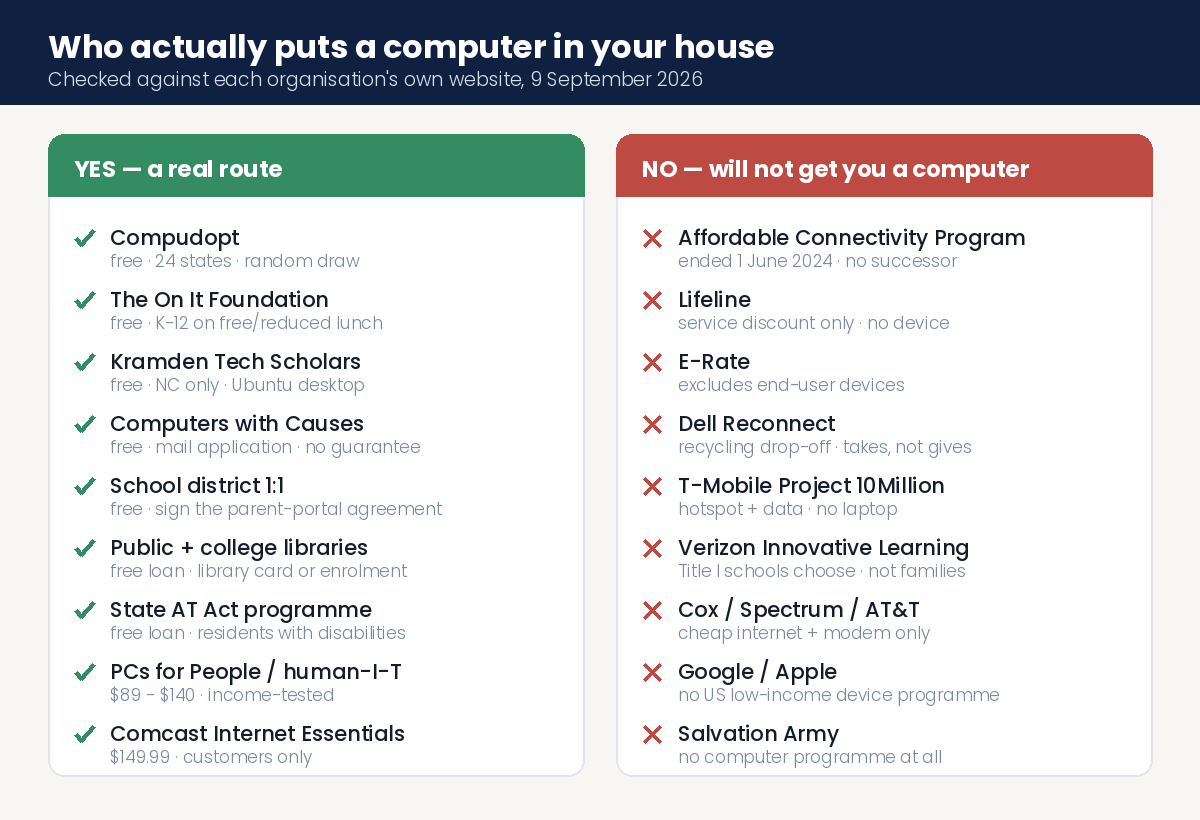
Dell Reconnect takes computers, it does not give them. This is the most-repeated error in the category. Dell Reconnect is a recycling partnership with Goodwill offering consumers “a free and convenient way to responsibly recycle their used electronics” at more than 2,000 drop-off locations across 44 states. It is alive and well — Dell refreshed the page on 12 August 2026 — and it flows in exactly the opposite direction from what you need.
T-Mobile Project 10Million gives hotspots and data, never laptops. It is a genuinely good programme and you should look at it for connectivity: families of eligible K–12 students get “one free T-Mobile hotspot device” and 200GB of mobile data per year for five years, one line per household, on proof of enrolment in CEP, FDPIR, Medicaid, the National School Lunch Program or SNAP dated within a year. Districts can also enrol on students’ behalf. It is not available in Alaska, American Samoa, Guam or the Northern Mariana Islands. No computer is included.
Verizon Innovative Learning provides devices, but you cannot apply. It supplies tablets, laptops and data plans plus a technology coach — to selected Title I schools. Schools and districts are chosen; families are not. If your child’s school is in the programme you will hear from the school.
Cox, Spectrum and AT&T offer cheap internet and a modem, and no computer. Cox Connect2Compete is $9.95/month for families with K–12 children on qualifying programmes and includes a wifi modem rental; ConnectAssist widens eligibility to households under 200% of federal poverty guidelines. Spectrum Internet Assist is $15/month for households on the National School Lunch Program, the Community Eligibility Provision or SSI. Access from AT&T offers address-dependent low-cost pricing for households under 200% FPG or on SNAP, Medicaid, LIHEAP, Head Start, TANF or SSI. None of the three sells or gives a computer.
Google and Apple have no US low-income device programme. Google funds organisations — it has committed over $160 million across five years to groups working on education access — not families; there is no individual application. Chromebooks reach low-income students because school districts buy them. Apple offers up to 15% off certified refurbished machines and education pricing for students, parents and educators, and nothing need-based. Every top search result we found for “free Chromebook low income” was affiliate spam with no primary source behind it.
The Salvation Army does not distribute computers. Its national programme list covers meals, shelter, financial assistance, food pantries, camps, after-school programmes, life skills, disaster relief and thrift stores. Technology is not on it. It is an excellent first call for utility bills and food — just not for a laptop.
Operation Homefront and Vets Who Code do not give computers. Operation Homefront runs exactly four programmes — critical financial assistance, housing, family events and Military Child of the Year — none technology-related. Vets Who Code provides free 17-week remote technical training and states its own barrier to entry as “A computer, internet, and discipline”: you need to own one before you start.
Senior Planet from AARP is training, not devices. OATS, its parent organisation, describes multi-week courses, workshops and free live Zoom classes taught in English, Spanish and Chinese, free to anyone of any age. Nothing on OATS’ or AARP’s own pages describes device distribution. Articles claiming Senior Planet hands out free tablets are wrong.
World Computer Exchange is not for US households, and it charges. It supplies schools and NGOs in developing countries and says so plainly: “To cover sourcing, testing, and administrative costs, we charge modest fees for computers. Computers are not donated.” Laptop tiers run $95, $135 and $180 plus shipping, and recipients may owe import duties “sometimes up to 100% of the declared value.” Its own materials specify developing countries, not the USA.
Digitunity and Everyone On give you nothing directly — and are still worth using. Both are locators, and both say so. Digitunity: “While we do not provide computers directly to individuals, this page brings together trusted pathways and resources to help you.” Everyone On connects people to low-cost internet, computers and digital literacy training via a ZIP-code offer finder. Use them as maps, not as suppliers.
Two organisations you may find in older lists should not be contacted. InterConnection, the Seattle refurbisher, no longer controls its old domain — that address now serves an unrelated foreign gambling site, and we are deliberately not linking it. PCs for People began operating in Seattle on 1 February 2025 at InterConnection’s former address and describes InterConnection’s leadership as supporting the expansion; Seattle-area readers should go there instead. Komputers 4 R Kids in California has no live website and third-party listings for its Bellflower and Cerritos addresses are marked closed; we could not confirm a formal dissolution, only that there is no public programme to apply to.
Finally, 211 is worth calling and is not worth quoting. Dial 2-1-1 or use 211.org for a live human referral to local help — it is the single best way to find programmes that never appear online. But its own utilities page still promotes the Emergency Broadband Benefit and a “$50 per month” discount that has not existed since the ACP replaced it and the ACP itself ended in 2024. Use 211 for the phone call, not the figures.
How to find a refurbisher near you, step by step
Most of the free and cheap computers in America come from small local nonprofit refurbishers you have never heard of. There is a national map of them.
Go to Digitunity’s Supporting Technology Reuse page at digitunity.org. Their instruction is “Use this interactive map and the directory below to locate and learn about the organizations making a tremendous impact in communities throughout the United States” — click the map, or scroll the directory beneath it, find the organisations in your state, and then do the part that matters: “Please contact organizations directly to learn about eligibility, availability, and application processes.” Digitunity’s own count of members varies across its pages between roughly 70 and 100, so treat the map as the current list rather than any published number.
As a second pass, the National Digital Inclusion Alliance publishes an affiliate map at digitalinclusion.org/affiliates with filters by city and state. Not every affiliate distributes devices, so treat it as a broader net rather than a device directory.
Have these five things ready before you apply anywhere
Nearly every rejection we can see in these programmes’ published rules comes down to documents, not eligibility. Gather this once and you can apply everywhere in an afternoon.
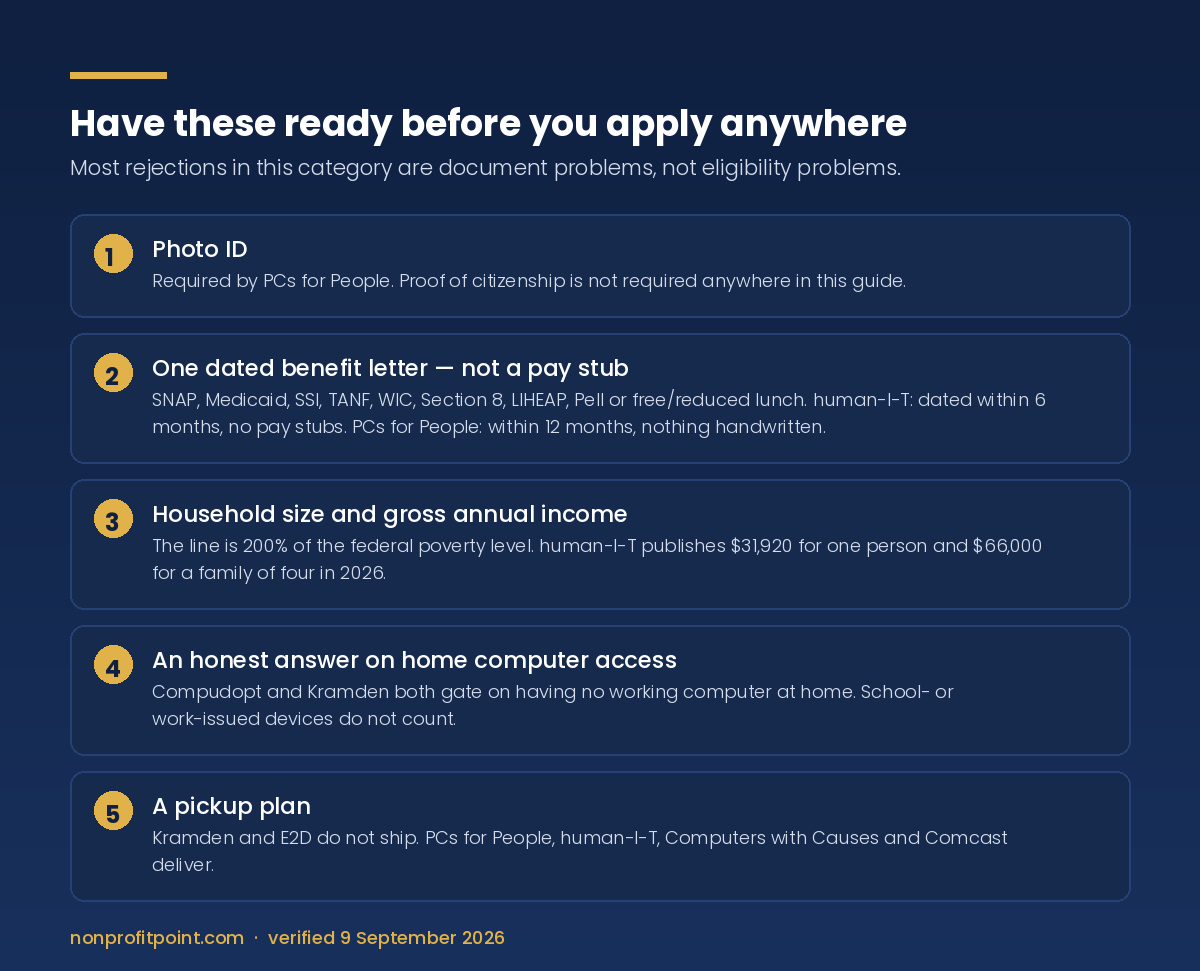
1. Photo ID. PCs for People requires it. Proof of citizenship is not required anywhere in this guide.
2. One dated benefit letter, not a pay stub. A SNAP, Medicaid, SSI, TANF, WIC, Section 8, LIHEAP or free/reduced-lunch letter is the universal key. human-I-T requires it dated within six months and explicitly does not accept pay stubs; PCs for People allows twelve months and does not accept handwritten documents.
3. Your household size and gross annual income. The 200% of federal poverty level line does most of the work in this category. human-I-T publishes its 2026 thresholds as $31,920 for one person and $66,000 for a family of four in the contiguous states.
4. A realistic answer to “do you have a working computer at home.” Compudopt and Kramden both gate on this, and both exclude devices provided by a school or an employer from counting.
5. A pickup plan. Kramden does not ship. Compudopt distributions are in-person. E2D is Charlotte-based. Library and college loans are collected in person. If you cannot travel, filter to PCs for People, human-I-T, Computers with Causes and Comcast, which all deliver.
Related help
If a computer is on the list because money is tight generally, these are the other guides worth reading — most families who arrive here need two or three of them at once.
- Get Help Paying For… every financial assistance guide — the master directory
- Charities that help with internet — the other half of getting online
- Free school supplies for kids and school clothes
- Charities that give money to individuals
- Emergency financial assistance and free financial assistance organizations
- Single mothers, single fathers and grants for single mothers
- Seniors with bills and housing assistance for disabled veterans
- Free cars for low-income families and transportation help
- Free furniture and appliances near you
- Rent, heating bills, bills generally and medical bills
- Free childcare services
Frequently asked questions
Is there a government program that gives free laptops in 2026?
No. There is currently no federal programme a household can apply to for a free or subsidised computer. The Affordable Connectivity Program, which offered a one-time device discount of up to $100 toward a laptop, desktop or tablet, ended on 1 June 2024 for lack of Congressional funding and has no successor. Lifeline is still running but discounts phone and internet service only. E-Rate expressly excludes end-user devices. The Emergency Connectivity Fund, which did reimburse laptops, reimbursed schools and libraries rather than families and has wound down. Every real route today is a nonprofit, school district, library, disability programme or internet provider.
What happened to all the state programs that used to give out computers?
Most of them were funded by Digital Equity Act grants that were terminated on 9 May 2025. California confirms a $70 million capacity grant was ended immediately; Pennsylvania was told programme activities must cease immediately; North Carolina lost a $22.4 million capacity grant and cancelled the $17 million Digital Opportunity grant that was going to distribute computers to residents. Minnesota’s Tech Connect programme, which gives free computers to approved applicants, currently shows “Applications are Currently Paused.” Illinois’ Computer Equity Network page now redirects to a department homepage. Check any state programme’s link before you rely on it.
Which programs are genuinely free rather than low-cost?
Four give computers away for nothing: Compudopt, which runs random-draw giveaways in 24 states for households with no working home computer; The On It Foundation, for K–12 students on free or reduced lunch; Kramden Institute’s Tech Scholars, which gives North Carolina students a free Ubuntu desktop collected in Durham; and Computers with Causes, which mails refurbished machines subject to inventory with no guarantee. Beyond those, school district 1:1 devices, public library loans, college library loans and state Assistive Technology programme loans are all free to the user.
How much does a refurbished laptop from a nonprofit actually cost?
Roughly $40 to $150 depending on the organisation and the machine. On 9 September 2026, Kramden’s adult programme listed $40 desktops and $70 laptops for North Carolina residents; human-I-T advertised Chromebooks from $89.99 and Windows laptops at $199.99 for income-qualified members; E2D sells refurbished laptops at $100 in and around Charlotte; PCs for People listed Dell Latitude laptops at $125 and $140; and Comcast sells Internet Essentials customers a new Dell laptop or Chromebook for $149.99 plus tax. Refurbisher stock rotates, so confirm the current price before planning around it.
What income do I need to qualify?
The common line is 200% of the federal poverty level. human-I-T publishes its 2026 thresholds as $31,920 for a single person, $43,280 for two, $54,640 for three and $66,000 for a family of four in the contiguous states, adding $11,360 per additional person. PCs for People uses less than 200% of federal poverty guidelines or 60% of area median income. In practice you rarely need to prove income at all: enrolment in SNAP, Medicaid, SSI, SSDI, TANF, WIC, Section 8, LIHEAP, a Pell Grant or free/reduced lunch qualifies you at almost every organisation in this guide.
What documents will they ask for?
Photo ID plus one dated document showing a household member’s name on a qualifying programme. The dating rules differ and cause most rejections: human-I-T requires the document to be dated within the last six months and does not accept pay stubs, while PCs for People allows the last twelve months and does not accept handwritten documents. human-I-T approval then stays valid for fifteen months. Proof of citizenship is not required by any programme in this guide.
Does Dell Reconnect give free laptops?
No — it runs in the opposite direction. Dell Reconnect is a recycling partnership between Dell and Goodwill that gives consumers a free way to drop off used electronics at more than 2,000 locations in 44 states. You give a computer to it; it does not give one to you. The programme is still active as of Dell’s page update on 12 August 2026, which is why it keeps appearing on lists where it does not belong.
Does T-Mobile Project 10Million give free laptops to students?
No. It provides one free T-Mobile hotspot device and 200GB of mobile data a year for five years, one line per household, to families of eligible K–12 students who show enrolment in CEP, FDPIR, Medicaid, the National School Lunch Program or SNAP dated within the past year. School districts can also apply on students’ behalf. It is a strong connectivity programme and it includes no computer. It is unavailable in Alaska, American Samoa, Guam and the Northern Mariana Islands.
My child’s school gave out laptops and we never got one. What do I do?
Call the school office rather than the district. In 1:1 districts, the take-home device is usually released by an opt-in agreement a parent signs in the online parent portal, not by an application — Broward County Public Schools, for example, releases devices through a Device Issuance Agreement in its Focus parent portal, published in four languages. If a device was issued and is broken or missing, districts typically route that through the school office or a help-desk ticket. Read the agreement first: districts commonly hold families financially responsible for damage or non-return, with replacement costs in the hundreds of dollars.
Where do I look if none of these cover my area?
Two maps and one phone call. Digitunity’s Supporting Technology Reuse page maps nonprofit refurbishers across the country and tells you to contact each organisation directly about eligibility and availability, because terms are set locally. The National Digital Inclusion Alliance publishes an affiliate map filterable by city and state. Then dial 2-1-1, which will connect you to a local referral specialist who knows about programmes that never appear in a search result — just do not rely on 211’s own published broadband figures, which still cite a benefit that ended years ago.
How we checked this
Every programme, price, eligibility rule and quotation in this guide was read from the organisation’s or agency’s own website on 9 September 2026. Where a figure is not published, we have said so rather than borrowing one from elsewhere: we do not state whether Computers with Causes charges shipping, what device The On It Foundation issues, or what Cox ConnectAssist costs, because none of those three organisations publishes it. Where two of an organisation’s own pages disagree — Tech For Troops describes its computers as free in one place and low cost in another — we have printed the disagreement rather than picking a side. Refurbisher prices are live retail inventory and rotate; confirm before you plan around them. If you find a link here that has moved or a programme that has closed, tell us and we will correct it.
Written and verified by the Nonprofit Point research desk. Checked against primary sources on 9 September 2026. We print the date we checked rather than promising a re-verification schedule we cannot guarantee.
A laptop is only half the problem. If you also need to get online, see our verified guide to charities that help with internet bills — it covers Lifeline, nonprofit hotspot plans at around $15 a month, and which providers still accept you if you owe them money.