Best Accounting Software for Nonprofits 2026: Verified Prices, Real Fund Accounting, and the $80 Route

Reviewed and fact-checked 26 September 2026. Every price, admin fee, eligibility rule and filing threshold below was read directly from the vendor’s own page, the IRS, FASB or the relevant statute on that date. Where a vendor would not publish a price, or where we could not confirm a figure at the source, we say so rather than repeat what other sites claim.
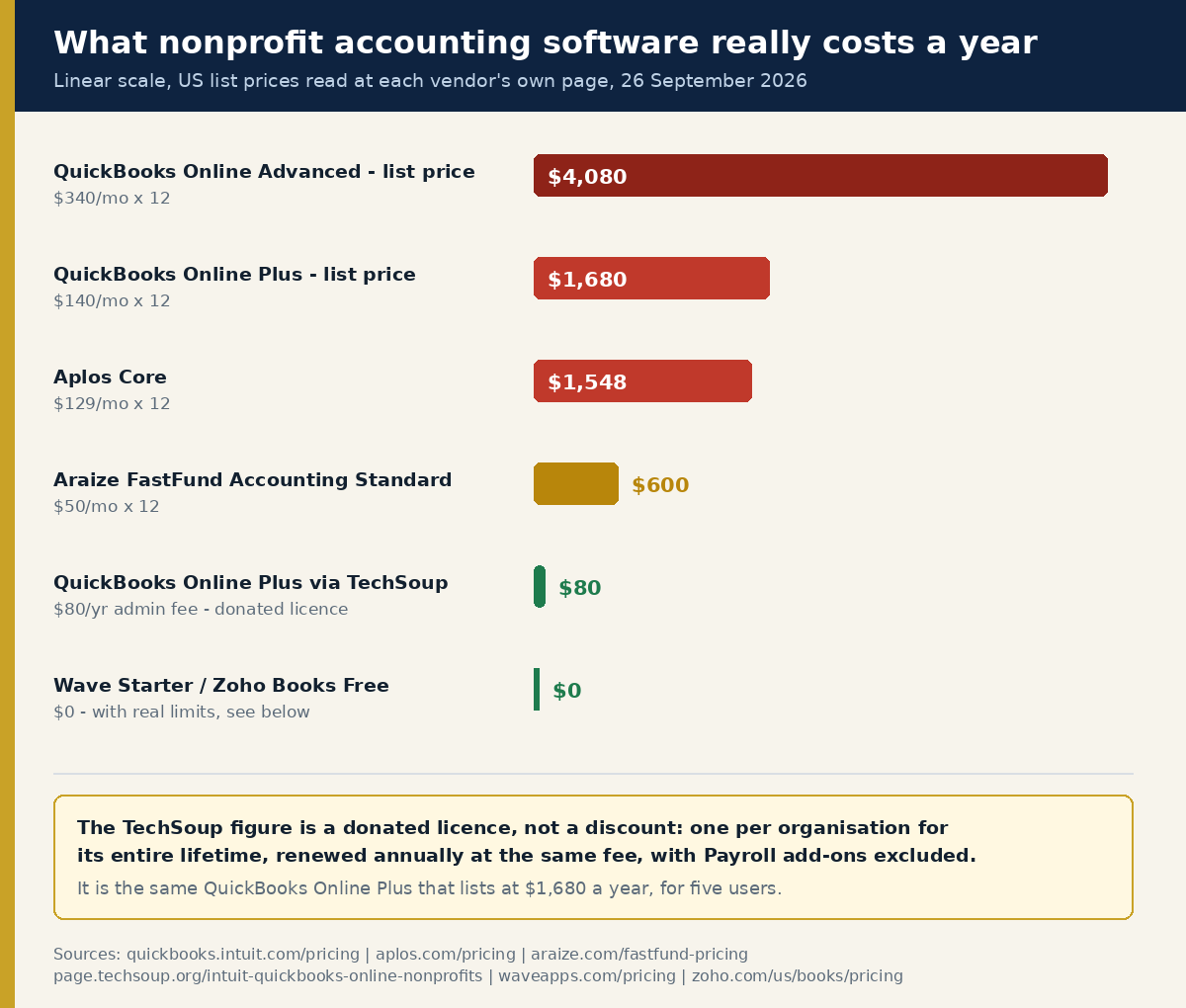
Start with the number that matters most, because almost no other guide leads with it: an eligible 501(c)(3) can get QuickBooks Online Plus for an $80 annual admin fee through TechSoup. The same plan lists at $140 a month on Intuit’s own pricing page — $1,680 a year. That is a 95% difference on the single most widely used accounting product in the sector, and it is sitting in plain sight.
It is not free, it is not unlimited, and it has a catch we will spell out. But if you are a small nonprofit reading a “best accounting software” list that ranks ten products by star rating and never mentions the donation programme, you are reading a list written for advertisers rather than for you.
The second thing worth saying up front: most of the products marketed to nonprofits as “fund accounting” are not doing fund accounting. They are letting you tag a transaction. That is a real difference with real consequences once an auditor is in the room, and we have separated the two below using each vendor’s own wording rather than a review site’s.
The short answer, by organisation size
| Your situation | What to use | Annual cost |
|---|---|---|
| Gross receipts under about $50,000; one or two restricted grants | A free tool, or donated QuickBooks Online Plus if you qualify | $0 – $80 |
| $50,000 – $500,000, several restricted funds, no audit yet | Donated QuickBooks Online Plus via TechSoup, using classes as funds | $80 admin fee |
| You want real funds in the ledger, not classes, and you are small | Araize FastFund Accounting (Premium if you need accrual) | $600 – $1,320 |
| Church, small charity, want fund accounting plus donor tools in one place | Aplos Core | $1,548 |
| You have used your one lifetime TechSoup licence and outgrown classes | QuickBooks Online Plus at list, or move to a fund product | $1,680+ |
| $1m+ in federal awards, multi-entity, or a single audit ahead | MIP, Blackbaud Financial Edge NXT, Sage Intacct — all quote-only | Not published |
Everything under that table is the evidence. If you only have five minutes, read the TechSoup section and the section on what your compliance load actually requires, and skip the rest.
The $80 route: donated QuickBooks Online through TechSoup
TechSoup is the nonprofit technology donation clearing house. Software companies donate licences; TechSoup charges an administrative fee to process them. For accounting, the current offer is narrow and specific.
From TechSoup’s own Intuit for Nonprofits page, read 26 September 2026:
- QuickBooks Online Plus, 1-Year Subscription, 5 Users — “Admin Fee $80 per year”
- QuickBooks Online Advanced, 1-Year Subscription, 25 Users — “Admin Fee $170 per year”
Set those against Intuit’s published list prices, read the same day: Plus is “$140/mo” and Advanced is “$340/mo”. Over a year that is $1,680 and $4,080. The donated versions are the same software.
Now the limits, because they are real and they are where the sector’s advice usually goes quiet:
- “One donated subscription per organization lifetime.” TechSoup states it twice on the page, and its FAQ adds: “Intuit for Nonprofits allows organizations one donated QuickBooks Online subscription in their lifetime. Programs and departments are typically not eligible to request their own subscriptions, while separate branch or office locations may be eligible.” This is once, ever. Choose between Plus and Advanced deliberately rather than taking Plus because it is cheaper this year.
- You still pay the fee every year. TechSoup: “QuickBooks Online Plus, 1-Year Subscription, 5 Users is currently available for $80 per year.” It is a renewable donated licence, not a one-off purchase.
- “Add-on services such as Payroll are not available through TechSoup.” If you have staff, budget for payroll separately.
- Eligibility is narrow: “your organization must be recognized as a 501(c)(3) Public Charity by the IRS.”
- Basic TechSoup membership costs nothing. The paid tier is optional: “TechSoup Membership – Free” and “TechSoup Plus Membership – $200 annually.” You do not need TechSoup Plus to request QuickBooks.
The QuickBooks Desktop trap: it is no longer for sale
A large share of the “best nonprofit accounting software” articles still published today recommend QuickBooks Premier Nonprofit Edition. You cannot buy it.
Intuit’s own support article states that it decided “after September 30, 2024, to stop selling new subscriptions” of “QuickBooks Desktop Pro Plus, QuickBooks Desktop Premier Plus, QuickBooks Desktop Mac Plus, QuickBooks Desktop Enhanced Payroll.” Premier Nonprofit is an industry edition of Premier Plus, so it falls inside that list. Existing subscribers are fine — Intuit says they “can continue to renew their subscriptions after September 30, 2024” — but a nonprofit starting from scratch in 2026 cannot subscribe.
The donated route closed too. TechSoup’s support page: “In February 2026, Intuit for Nonprofits retired the last QuickBooks desktop offer available on TechSoup: QuickBooks Premier 2021,” and they “do not currently intend to offer QuickBooks desktop products on TechSoup in the future, and instead are moving to a cloud based model for all of their software.”
One desktop product remains purchasable: QuickBooks Desktop Enterprise, which Intuit says is “not impacted by this change.” Enterprise does ship a Nonprofit edition. We could not verify its price — Intuit routes the page to a sales phone number rather than publishing a figure — so treat it as a quote-only enterprise product, not the cheap desktop option people remember.
Fund accounting versus class tracking: the distinction that decides everything
Under FASB’s Accounting Standards Update 2016-14, a nonprofit must “Present on the face of the statement of financial position amounts for two classes of net assets at the end of the period, rather than for the currently required three classes. That is, an NFP will report amounts for net assets with donor restrictions and net assets without donor restrictions.”
Two classes. Not three. That matters when you are judging how current a vendor’s nonprofit knowledge actually is — and one of the products below still markets itself using the pre-2018 language.
The same standard requires something else that catches small organisations out: “All NFPs shall report information about all expenses in one location — on the face of the statement of activities, as a schedule in the notes to financial statements, or in a separate financial statement,” broken out by function and by natural classification. Functional expense analysis used to be a requirement only for voluntary health and welfare organisations. It now applies to every nonprofit. If your software cannot split salaries across programme, management and fundraising, you will be doing that split by hand every year.
So there are two ways to satisfy this:
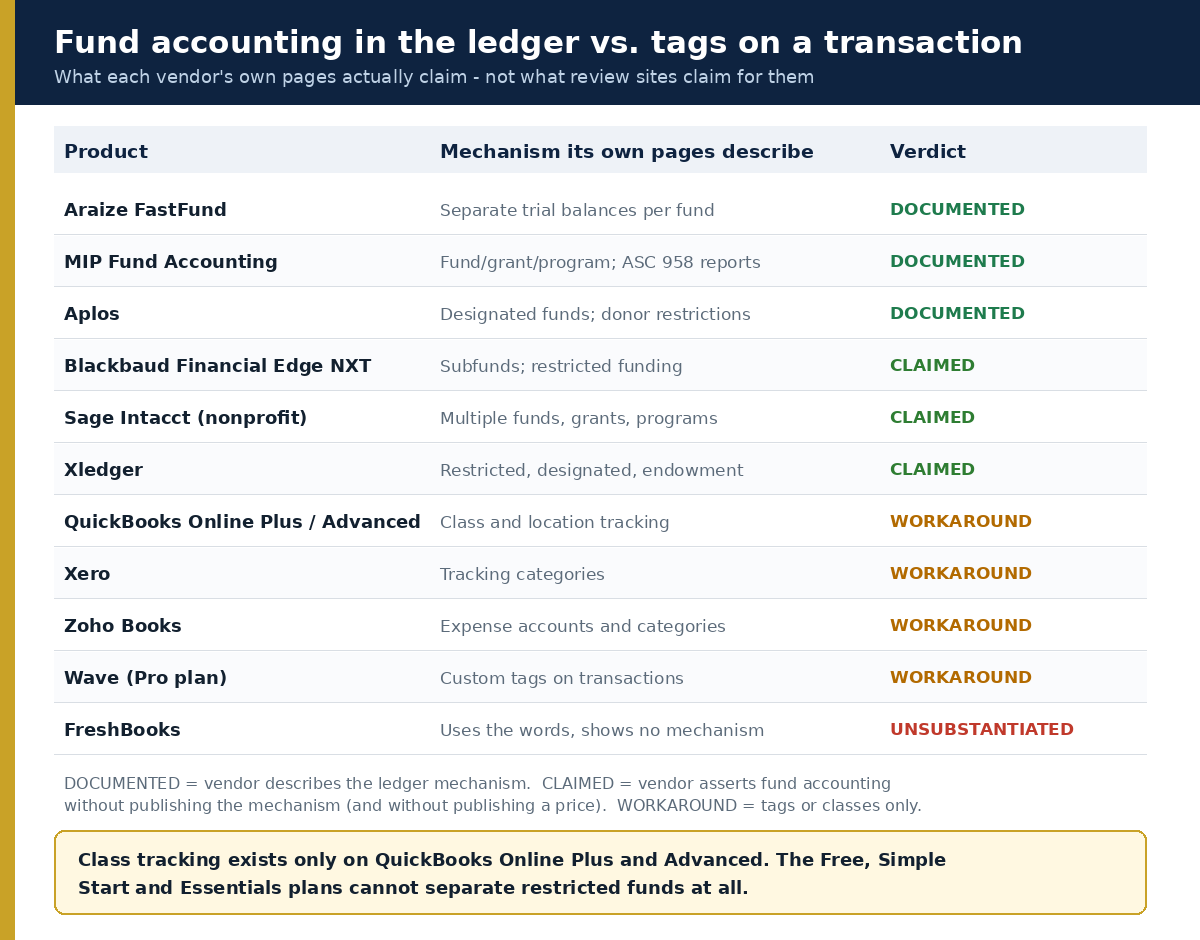
Fund accounting in the ledger. Each fund behaves as a self-balancing set of books. Araize is the most explicit about the mechanism: “Each fund is treated as its own entity within your organization, with separate trial balances and financial statements.” MIP Fund Accounting documents the resulting statements by name — its Statement of Financial Position report is described as printing “the ASC 958 (FAS 117 superseded) balance sheet equivalent.”
Class or tag tracking. You keep one set of books and label each transaction with the fund it belongs to. QuickBooks calls this class and location tracking, Xero calls it tracking categories, Zoho calls it categories, Wave calls it custom tags. Done rigorously, it works, and thousands of small nonprofits run this way. Done casually — one untagged transaction and the fund balances stop reconciling — it produces a mess that costs more in audit fees than the software ever saved.
The trap is the tier. Intuit’s own help article says class tracking is available in exactly two plans: “You can do this in QuickBooks Online Plus and QuickBooks Online Advanced.” Location tracking carries the same restriction. The Free plan, Simple Start at $38 and Essentials at $85 have neither. So the common advice — “just use QuickBooks, the cheap plan is fine” — is wrong for any nonprofit with a restricted grant. The cheap plans cannot separate funds at all.
That is also why the TechSoup offer is well targeted: the donated plan is Plus, which is precisely the lowest tier that can do the job.
One vendor uses the words without showing the mechanism
FreshBooks’ nonprofit landing page promises to “Simplify fund accounting for multiple projects.” We looked for documentation of how funds are segregated, what happens to a restricted balance, or which report shows net assets with and without donor restrictions. We found none. FreshBooks is strong invoicing software. Treat the fund-accounting claim as marketing until the vendor publishes the mechanism.
Purpose-built nonprofit accounting software that publishes its prices
Aplos — $79 to $229 a month
Aplos is the most visible small-nonprofit accounting product, aimed heavily at churches. Its published US pricing, read 26 September 2026:
- Lite — $79/month, 2 users. “Best for small organizations with basic accounting needs.”
- Core — $129/month, 2 users. “Best for growing teams needing fund accounting.”
- Advanced — $229/month, 3 users. “Best for organizations with 250K+ in annual revenue.”
- Custom — “Tailored Pricing.” “Best for organizations with $1million+ in annual revenue.”
Read the tier names carefully. Aplos itself places fund accounting on Core, not Lite. If you are buying Aplos for fund accounting, Lite is not the plan, and your real entry price is $1,548 a year.
The trial is generous and genuinely frictionless: “Sign up for your 15-day free trial. No credit card required.” A promotional code (FALL26, 50% off three months) was live at the time of writing but the page states it “is only available to new customers and ends September 30th” — four days after this article was published, so plan around the regular price.
On funds, Aplos says: “Track designated funds, such as your missions fund, building fund, or grants,” and “Keep track of gifts with donor restrictions to make sure they are used for correct purposes.” Its named reports are “Balance Sheet by Fund” and “Income Statement by Fund” rather than the FASB statement titles.
The 990 support is narrower than the marketing implies. Aplos says it will “Quickly and accurately prepare and file Form 990-N and Form 990-EZ returns online.” That is the e-Postcard and the short form. If you file the full Form 990, the filing still happens elsewhere.
Araize FastFund — $50 to $110 a month, and the cheapest real fund ledger we found
Araize publishes a modular price list, read 26 September 2026:
- Accounting – Standard: $50/month. Includes “Cash Based Accounting, Fund Accounting, Six Segment Account Number, Budgeting, Project Tracking, FASB-Compliant Financial Statements, Bank Integration, Transaction Import, Recurring Transactions, Expense and Revenue Allocations, 990 Reporting.”
- Accounting – Premium: $110/month. Adds “Accrual Based Accounting, Accounts Payable, Accounts Receivable, Direct Cost Allocations.”
- Fundraising from $50/month, “based on number of active donors.” Payroll from $55/month, “based on number of active employees.” An LT Bundle at $300/year.
- “No long-term contracts” and “Unlimited free support included.”
Read the tier split again, because it is the single most important thing about this product and it is easy to miss: accrual accounting is Premium-only. If a state audit threshold is anywhere on your horizon, your auditor will want GAAP financial statements, and GAAP means accrual. The $50 plan will not get you there. Budget $110.
What you get for it is unusually explicit. Araize says it lets you “Track restricted, unrestricted, grant, program, and project activity without spreadsheets or workarounds,” that “Each fund is treated as its own entity within your organization, with separate trial balances and financial statements,” and that it “generates audit ready, FASB compliant financial statements including the Statement of Activities and Changes to Net Assets, Statement of Financial Position (Balance Sheet), Statement of Activities (Revenue and Expense), Functional Expenses and Statement of Cash Flow.” That is the whole required statement set by name, from a $110-a-month product.
One flag, in fairness. The same page describes helping nonprofits manage “restricted, temporarily restricted, and unrestricted funds” — the three-class model FASB replaced with two classes in ASU 2016-14, effective for fiscal years beginning after 15 December 2017. The underlying statements are described as FASB compliant; the marketing copy is eight years out of date. Ask about it on the trial.
A free trial exists and does not require a card. The exact trial length is not stated on either the pricing page or the trial page — we are flagging that as unverified rather than guessing at it.
The tier that will not tell you the price
Four serious nonprofit accounting systems appear on every enterprise shortlist. None of them publishes a price. We checked each vendor’s own site on 26 September 2026 and this is worth knowing before you spend three weeks in demos.
MIP Fund Accounting (Community Brands, now routing to Momentive Software). No price on any page checked; every route ends at “Request a Demo.” The product itself is the real thing: “built around fund accounting structures,” “Track unlimited number of fund, grant, program, or project,” and “Transaction tracking by fund, program, and grant simultaneously.” Its documentation names the statements explicitly, including the Statement of Activities report described as printing “the ASC 958 (FAS 117 superseded) statement of revenues, expenditures, and changes in net assets equivalent.”
Blackbaud Financial Edge NXT. Blackbaud is candid about why there is no number: “Blackbaud pricing is customized based on your organization’s size, goals, and the solutions you need… Instead of a one-size-fits-all price, we provide a personalized quote.” The product claims to be “the most comprehensive fund accounting software on the market” and to let you “Track grants, projects, and endowments in granular detail with flexible subfund functionality.” We could not find the three FASB statements named anywhere on the product page, nor any Form 990 capability — both go on the demo question list rather than into this article as facts.
Sage Intacct (nonprofit). Two tiers, both unpriced: a Standard Plan “For the needs of established small and mid-size nonprofit organizations” and a Premium Plan “For the robust needs of larger, more complex nonprofit organizations.” Note the word “established” — Sage’s own segmentation says this is not a product for a two-year-old charity. The page describes “cloud-based fund accounting software designed for nonprofits managing multiple funds, grants, and programs” and references statements of activities, financial position and cash flow.
Xledger. Also quote-only. Claims “Fund accounting, grant tracking, program budgets, and donor reporting” and the ability to “Keep track of restricted, designated, and endowment funds.”
Our position on quote-gating is simple and unpopular with vendors: treat it as a selection criterion, not a formality. A vendor that will not print a number before it knows your budget is a vendor whose number depends on your budget. Get two quotes in parallel, ask for the implementation fee separately from the licence fee, and ask what the price does at renewal.
General accounting software nonprofits actually use
Most small nonprofits in the US do not run purpose-built fund accounting software. They run mainstream small-business software with classes or tags. Here is what that costs at list, all figures read from each vendor’s own US pricing page on 26 September 2026.
QuickBooks Online
| Plan | List price | Class / location tracking? | Usable for restricted funds? |
|---|---|---|---|
| Free | $0/mo | No | No |
| Simple Start | $38/mo | No | No |
| Essentials | $85/mo | No | No |
| Plus | $140/mo | Yes | Yes, via classes |
| Advanced | $340/mo | Yes | Yes, via classes |
Intuit was running “50% off for 3 months” on every paid tier at the time of writing. Three months of half price on a product you will keep for five years is not a reason to choose it; the list price is the real price.
Intuit does market a nonprofit configuration — there is a dedicated nonprofit page for QuickBooks Online and another for Advanced, promising you can “Categorize revenue expenditures by fund or program.” That is class tracking with nonprofit vocabulary on top. Notably, the word “restricted” does not appear on Intuit’s nonprofit landing page at all.
Xero
Three US tiers, quoted here at the regular price rather than the promotional one: Early “Then $25 per month,” Growing “Then $55 per month,” Established “Then $90 per month.” A 90% first-six-months discount was running for purchases by 30 September 2026.
Xero does offer a nonprofit discount, and this is where we part company with most articles on this topic. Xero’s own nonprofit page says only: “The nonprofit discount rate is applied once you’ve subscribed to Xero and we’ve confirmed your not-for-profit status.” No percentage is published. A figure of 25% circulates widely; we found it only on third-party sites, never on xero.com, so we will not repeat it as fact. Subscribe, get your status confirmed, and find out what you are actually offered.
Xero’s fund workaround is tracking categories. Which of its three plans include them, and with what limits, is not stated on the pricing page and we could not confirm it from Xero’s own documentation — flagging that as unverified. Ask before you subscribe, because tracking categories are the entire nonprofit case for Xero.
Zoho Books
Zoho is the only mainstream vendor with a genuinely free tier that has a clearly stated ceiling: “As long as your revenue for the financial year does not exceed the threshold of $50K, Zoho Books’s Free Plan is available indefinitely.” The Free plan allows “Up to 1,000 invoices” a year.
That $50,000 line is a striking coincidence: it is almost exactly the IRS threshold below which you may file the Form 990-N e-Postcard. If you are under it, Zoho Books Free plus the IRS e-Postcard is a complete, no-cost compliance stack.
Paid tiers run $20/month (or $15 billed annually) for Standard, $50/$40 for Professional, $70/$60 for Premium, and higher for Elite and Ultimate. Zoho markets a nonprofit page, but the capability it describes is categorisation: “Create separate expense accounts, categorize funds, and generate expense reports.” No restricted-fund mechanism is claimed.
Wave
Wave is still free at the bottom, and the free tier is more capable than most “free” software: the Starter plan is $0 and includes “unlimited estimates, invoices, bills, and bookkeeping records,” with card payments at 2.9% + $0.60 per transaction.
The Pro plan is $19 USD/month or $190 USD/year and is where bank-feed automation lives — “Auto-import bank transactions” and “Auto-merge and categorize bank transactions.” If you are reconciling more than about thirty transactions a month, the manual import on Starter will cost you more in volunteer hours than $190 a year.
Wave is honest about its nonprofit fit in a way that deserves credit. Its own help centre confirms it “supports any business legally recognized as a non-profit organization by a government body,” describes donation tracking through “custom tags assigned to related transactions (available with Pro Plan subscription),” and answers the discount question bluntly: “No, Wave does not offer discounts for non-profit businesses.” Tags on the paid plan, no nonprofit pricing, no pretence of fund accounting.
FreshBooks
List prices are $23/month for Lite, $43 for Plus and $70 for Premium, with Select quoted. Heavy promotional discounting was running. As noted above, the nonprofit page claims fund accounting without documenting it. FreshBooks earns its place in a nonprofit stack when you invoice for contracted services; it does not earn a place as your fund ledger.
What is actually free, and what only looks free
“Free nonprofit accounting software” is a heavily gamed search. Here is what survived checking.
Genuinely free, with limits stated by the vendor:
- Wave Starter — $0. Real double-entry bookkeeping, unlimited invoices and records. You import bank transactions by hand unless you pay.
- Zoho Books Free — $0 below $50,000 annual revenue, capped at 1,000 invoices a year, “available indefinitely” while you stay under the ceiling.
- Manager Desktop Edition — “Fully-featured and free forever… There are no time limits, no usage limits, no ads.” A desktop application, so it lives on one machine and your backup discipline is the whole disaster-recovery plan. The cloud and server editions are paid; we could not retrieve their prices.
- GnuCash — free and open source, “freely licensed under the GNU GPL,” with proper double-entry accounting. One honest caveat: GnuCash’s own Tutorial and Concepts Guide does not document nonprofit or fund accounting at all. People do run nonprofits on it, but they are adapting a personal-and-small-business tool, working from community advice rather than vendor documentation. Budget for that.
- Filing your Form 990-N costs nothing. The IRS operates its own e-Postcard system at sa.www4.irs.gov/epostcard/. You will need a Login.gov or ID.me account. Nobody needs to sell you 990-N filing.
Widely believed to be free, and is not:
- Google for Nonprofits does not include accounting software. What it grants, per Google’s own eligibility page, is Google Workspace for Nonprofits, Google Ad Grants, the YouTube Nonprofit Program, and Google Earth and Maps. That is it.
- Microsoft for Nonprofits does not include accounting software either. It grants Microsoft 365 Business Basic free for up to 300 users, $2,000 in annual Azure credits, up to 50 Windows 11 Pro licences through TechSoup, and discounted rates on the rest. Dynamics 365 Business Central, which does handle financial management, is listed at $32 per user per month — discounted, not donated.
- NetSuite Social Impact is a genuine donation programme offering “cloud technology donations, product discounts, pro bono services, and capacity-building workshops,” including “NetSuite’s base software donation and no-cost activation.” Eligibility is specific: the organisation’s “primary purpose is non-religious and non-political,” it does not discriminate on a long list of grounds, and it “is not a government entity or public higher education institution.” What the ongoing cost looks like beyond the donated base is not published, and a full ERP carries implementation costs that dwarf any licence. Worth applying for if you are large enough to need an ERP; not a shortcut for a small charity.
How much software your compliance load actually requires
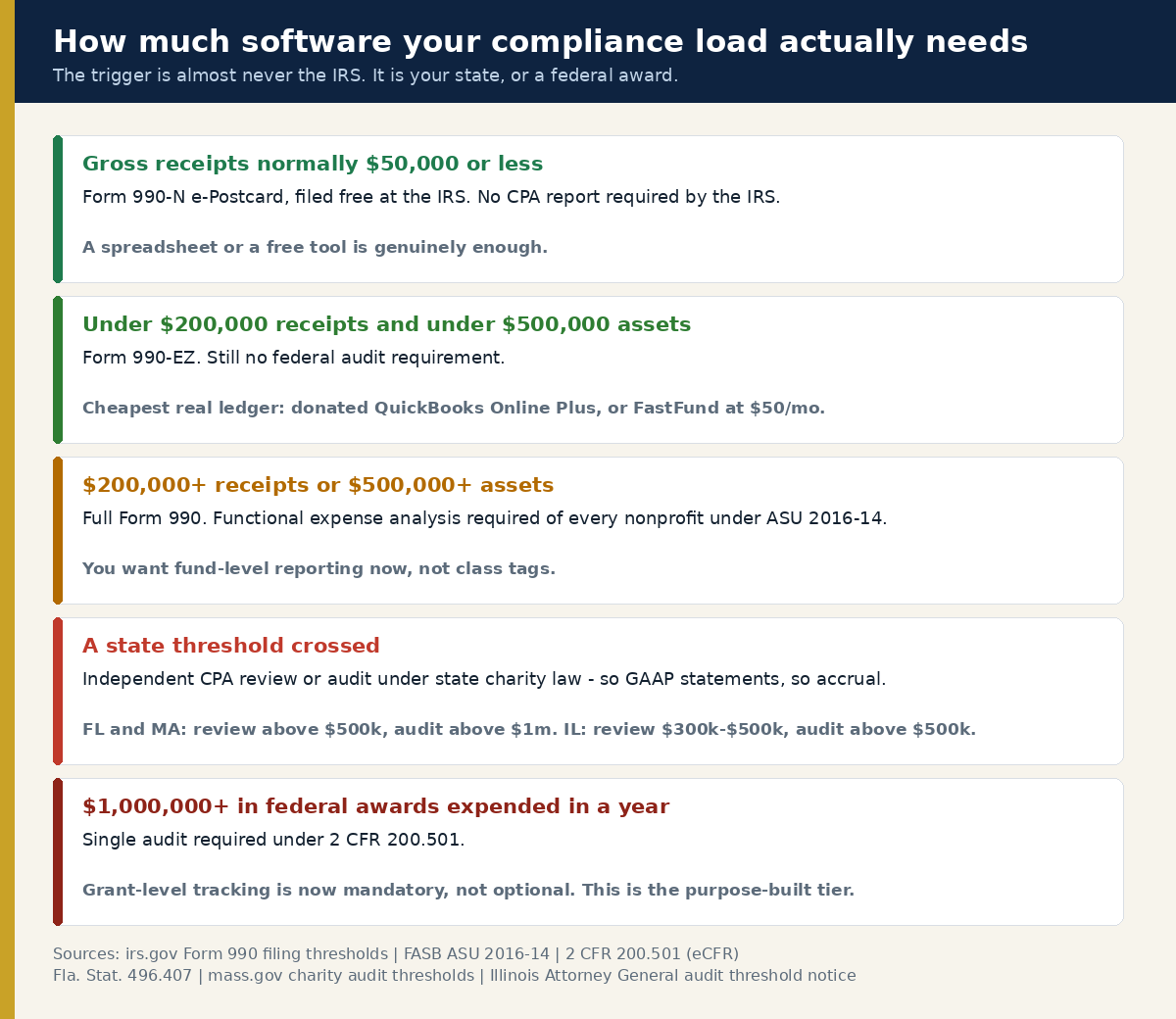
Software vendors sell against fear of an audit. Most nonprofits are nowhere near one. Work out which tier you are in before you buy anything.
What the IRS requires
The filing thresholds, from the IRS’s own page on which forms exempt organisations file:
- Form 990-N (e-Postcard): gross receipts normally $50,000 or less. The IRS puts it plainly: “Small tax-exempt organizations generally are eligible to file Form 990-N to satisfy their annual reporting requirement if their annual gross receipts are normally $50,000 or less.”
- Form 990-EZ: gross receipts under $200,000 and total assets under $500,000.
- Full Form 990: gross receipts of $200,000 or more, or total assets of $500,000 or more.
- Form 990-PF: private foundations, regardless of size.
The consequence of ignoring this is severe and automatic: organisations “that fail to file required Forms 990, 990-EZ or 990-N for three consecutive years will automatically lose their tax-exempt status.” Revocation is not discretionary and reinstatement is a paperwork exercise you do not want.
What the IRS does not do is force you onto accrual accounting. The Form 990 instructions say the organisation “should generally use the same accounting method on the return… that it regularly uses to keep its books and records.” Cash-basis books, cash-basis return.
What your state requires — this is usually the real trigger
State charity regulators, not the IRS, are what push nonprofits into CPA reviews, audits and therefore GAAP accrual accounting. The thresholds vary sharply. Three verified examples:
- Florida (Fla. Stat. 496.407): below $500,000 in annual contributions, “a compilation, audit, or review of the financial statement is optional.” From “at least $500,000 but less than $1 million” the statement “shall be reviewed or audited by an independent certified public accountant.” At “$1 million or more” it “shall be audited.”
- Massachusetts: a reviewed financial statement for “gross support and revenue greater than $500,000 and less than or equal to $1,000,000”; an audit for “more than $1,000,000 in the fiscal year.”
- Illinois: organisations whose fundraising is carried out by staff and volunteers must file an audit when contributions exceed $500,000, and reviewed financial statements between $300,000 and $500,000. The catch, in the Attorney General’s own words: “The audit threshold of $25,000 for charitable organizations who use the services of a paid professional fundraiser has not changed.” Hire a professional fundraiser in Illinois and your audit trigger drops by twenty-fold.
Every state writes its own rule and several index them to inflation. Check your own Attorney General or charity registry rather than assuming yours matches a neighbour’s.
Once a review or audit is triggered, the practical consequence is that a CPA issues an opinion against GAAP financial statements — which is where accrual accounting and real fund reporting stop being optional. That is the moment the $50 Araize plan becomes the $110 plan, or classes in QuickBooks become a genuine liability.
Federal awards: the single audit
If you spend federal grant money, one number governs. Under 2 CFR 200.501: “A non-Federal entity that expends $1,000,000 or more during the non-Federal entity’s fiscal year in Federal awards must have a single or program-specific audit conducted for that year.” Below it, the same section is equally clear: an entity that “expends less than $1,000,000 in Federal awards during its fiscal year is exempt from Federal audit requirements for that year.”
That threshold was raised in the 2024 revision of the Uniform Guidance. Articles and consultants still quoting the older, lower figure are out of date, and the difference is material — a single audit is a five-figure engagement. If you are near the line, the grant-level tracking that purpose-built fund accounting provides stops being a nicety.
How to choose in thirty minutes
- Find your compliance tier using the panel above. Your gross receipts and your state’s audit threshold decide more than any feature comparison will.
- Check whether you have used your lifetime TechSoup licence. If not, and you are a 501(c)(3) public charity, this is the decision. Plus at $80 or Advanced at $170 — and you only get to choose once, so take Advanced if you can see 25 users or heavy reporting in your future.
- Count your restricted funds. Nought to three, and classes will hold. More than about five, or any federal grant, and you want funds in the ledger.
- Ask whether you need accrual. If a state review or audit is coming, yes. That rules out Araize Standard and pushes you to Premium.
- Take two trials in the same week, with the same month of real transactions in both. Aplos gives you 15 days with no card. Araize has a no-card trial. Run your actual grant reporting through each, not the demo data.
- If you are going quote-only, get two quotes simultaneously and ask for implementation and renewal pricing in writing.
What we could not verify
Publishing what we failed to confirm is not a disclaimer; it is the difference between a researched page and a rewritten one. As of 26 September 2026:
- No price of any kind is published by MIP Fund Accounting, Blackbaud Financial Edge NXT, Sage Intacct or Xledger.
- QuickBooks Desktop Enterprise Nonprofit edition’s price. Intuit routes to a sales phone number instead of publishing one.
- The size of Xero’s nonprofit discount, and which Xero plans include tracking categories. Neither is on Xero’s own pages.
- The length of the Araize FastFund free trial, though we did confirm no card is required.
- Whether Blackbaud Financial Edge NXT produces the three named FASB statements, or supports Form 990 reporting. Neither claim appears on its product page.
- Manager’s cloud and server edition pricing.
- The ongoing cost of NetSuite beyond the donated base licence and “no-cost activation.”
Anywhere a figure appears above without a hedge, we read it on the source’s own page on 26 September 2026. Where a vendor is running a promotion, we quoted the regular price, because the promotion will end and you will still be paying.
Related help for nonprofit operations
Accounting software is one piece of the stack. These cover the rest, with the same pricing-verified approach:
- Best CRM for nonprofits — the donor database that sits alongside your ledger. QuickBooks records the dollar; a CRM records the relationship.
- Best donation platforms for nonprofits — a fee-by-fee comparison of what checkout actually costs you.
- Donorbox vs Givebutter — the head-to-head, with current pricing from both vendors.
- Best peer-to-peer fundraising software — for campaigns your supporters run on your behalf.
- Best text-to-give platforms — mobile giving, and the per-message costs nobody advertises.
- How to start a nonprofit in the US — if you are not yet a 501(c)(3), that status is the gate on almost every discount above.
- Fundraising for nonprofits — the strategy layer that determines what your books have to track.
Frequently asked questions
What is the cheapest way for a nonprofit to get QuickBooks?
Through TechSoup’s Intuit for Nonprofits donation programme. QuickBooks Online Plus for five users carries an $80 per year admin fee, and QuickBooks Online Advanced for 25 users costs $170 per year, against list prices of $140 and $340 per month. You must be recognised as a 501(c)(3) public charity by the IRS, basic TechSoup membership is free, and each organisation may take one donated QuickBooks Online subscription in its lifetime. Payroll add-ons are not available through the programme.
Can you still buy QuickBooks Premier Nonprofit Edition?
No, not as a new customer. Intuit stopped selling new subscriptions of QuickBooks Desktop Pro Plus, Premier Plus, Mac Plus and Enhanced Payroll after 30 September 2024, and Premier Nonprofit is an industry edition of Premier Plus. Existing subscribers may continue to renew. TechSoup retired its last desktop offer, QuickBooks Premier 2021, in February 2026 and says it does not intend to offer QuickBooks desktop products again. QuickBooks Desktop Enterprise, which does have a Nonprofit edition, is unaffected but is quote-priced.
Do I need fund accounting software, or is QuickBooks class tracking enough?
Class tracking is enough for many small nonprofits with a handful of restricted funds, provided every transaction is tagged without exception. It stops being enough when you have many restricted funds, federal grants requiring grant-level reporting, or an audit ahead. True fund accounting keeps each fund as its own self-balancing set of books with its own trial balance; class tracking is a label on a transaction in one set of books. The failure mode of classes is silent: one untagged entry and the fund balances no longer reconcile.
Which QuickBooks Online plan do nonprofits need?
Plus, at minimum. Intuit’s own documentation states that class tracking works in QuickBooks Online Plus and QuickBooks Online Advanced only, and location tracking carries the same restriction. The Free, Simple Start and Essentials plans cannot separate restricted funds at all, which makes them unsuitable for any nonprofit holding donor-restricted money. This is also why the TechSoup donated offer starts at Plus.
Is there genuinely free accounting software for nonprofits?
Yes, with real limits. Wave’s Starter plan is $0 and includes unlimited invoices and bookkeeping records, though automatic bank imports require the $19 per month Pro plan. Zoho Books is free indefinitely while annual revenue stays under $50,000, capped at 1,000 invoices a year. Manager’s Desktop Edition is described by its maker as “fully-featured and free forever” with no time or usage limits. GnuCash is free and open source, but its own documentation does not cover nonprofit or fund accounting.
How much does nonprofit accounting software cost in 2026?
At US list prices read on 26 September 2026: $0 for Wave Starter or Zoho Books Free, $80 a year for donated QuickBooks Online Plus through TechSoup, $600 a year for Araize FastFund Accounting Standard, $948 for Aplos Lite, $1,548 for Aplos Core, $1,680 for QuickBooks Online Plus at list and $4,080 for QuickBooks Online Advanced at list. MIP Fund Accounting, Blackbaud Financial Edge NXT, Sage Intacct and Xledger publish no prices at all.
Does Google for Nonprofits or Microsoft for Nonprofits include accounting software?
No. Google for Nonprofits grants Google Workspace for Nonprofits, Google Ad Grants, the YouTube Nonprofit Program, and Google Earth and Maps. Microsoft for Nonprofits grants Microsoft 365 Business Basic free for up to 300 users, $2,000 in annual Azure credits and up to 50 Windows 11 Pro licences through TechSoup, plus discounted rates on other products. Dynamics 365 Business Central handles financial management but is listed at $32 per user per month, which is a discount rather than a donation.
When does a nonprofit have to switch from cash to accrual accounting?
The IRS does not force the change. Its Form 990 instructions say an organisation should generally use the same accounting method on the return that it regularly uses to keep its books. What forces accrual in practice is an independent CPA review or audit, because the CPA issues an opinion against GAAP financial statements. Those audits are usually triggered by state charity law or by the federal single audit requirement, not by the IRS.
What income level requires a nonprofit audit?
It depends on your state and on whether you spend federal money. Florida requires a review or audit at $500,000 in annual contributions and an audit at $1 million. Massachusetts requires a review above $500,000 and an audit above $1 million of gross support and revenue. Illinois requires reviewed statements between $300,000 and $500,000 and an audit above $500,000, but drops the audit threshold to $25,000 for organisations using a paid professional fundraiser. Separately, any organisation expending $1,000,000 or more in federal awards in a fiscal year must have a single audit under 2 CFR 200.501.
Does accounting software file my Form 990?
Rarely, and never the full return. Aplos says it will prepare and file Form 990-N and Form 990-EZ online. Araize FastFund includes 990 reporting, meaning it generates the data you need rather than filing for you. Most other products produce reports you or your accountant then use to complete the return. If your gross receipts are normally $50,000 or less you can file the Form 990-N e-Postcard free directly with the IRS at sa.www4.irs.gov/epostcard/, using a Login.gov or ID.me account.