Best Nonprofit Auction Software in 2026: What 13 Platforms Actually Cost

Every charity auction platform on the market advertises one number and hides two. Some lead with a licence fee and stay quiet about the cut they take of your proceeds. Some lead with the word free and charge 5.9% the moment a winning bidder’s card is run. Three of the thirteen platforms in this guide will not publish a price at all.
We spent this week reading every pricing page, help-centre article and fee schedule these vendors publish, and then doing the arithmetic they do not do for you. What follows is the real cost of running a nonprofit auction in 2026 — licence, success fee and card rate together — plus the IRS paperwork and state raffle law that no software vendor will handle on your behalf.
Everything below was re-checked against the vendors’ own pages on 3 October 2026. Where a vendor publishes nothing, this guide says so rather than guessing.
The short answer
If you want to skip to a shortlist, here is the honest version:
- You are raising under $10,000 a year and have no budget: Auctria’s free Explorer plan is the only genuinely free, full-featured option — unlimited items, online bidding, ticketing and check-in, $0 a year. The cap is $10,000 of income per year and 250 bidders per event.
- You have 20 items or fewer and will collect money offline: 32auctions costs nothing at all if you take cash and cheques, because you only pay 32auctions when you process a card through them.
- You want one platform for tickets, check-in and bidding and you are willing to show donors a tip prompt: Givebutter — with the important caveat in its section below, because auction auto-charge is where the free model stops being free.
- You want to know your exact cost before you talk to a salesperson: ClickBid. It is the only vendor here that publishes a complete price list, and event-night phone support is included in the base tier.
- You run a large annual gala with a live auction, a fund-a-need and a volunteer check-in crew: OneCause or Greater Giving, accepting that Greater Giving will not quote you a number until you take a call.
- You need a donor database as much as you need an auction: Bloomerang, remembering that its auction-capable Fundraising product cannot be bought on its own.
Now the detail, because the shortlist above hides exactly the kind of fine print this guide exists to drag into the open.
Three numbers decide what auction software really costs
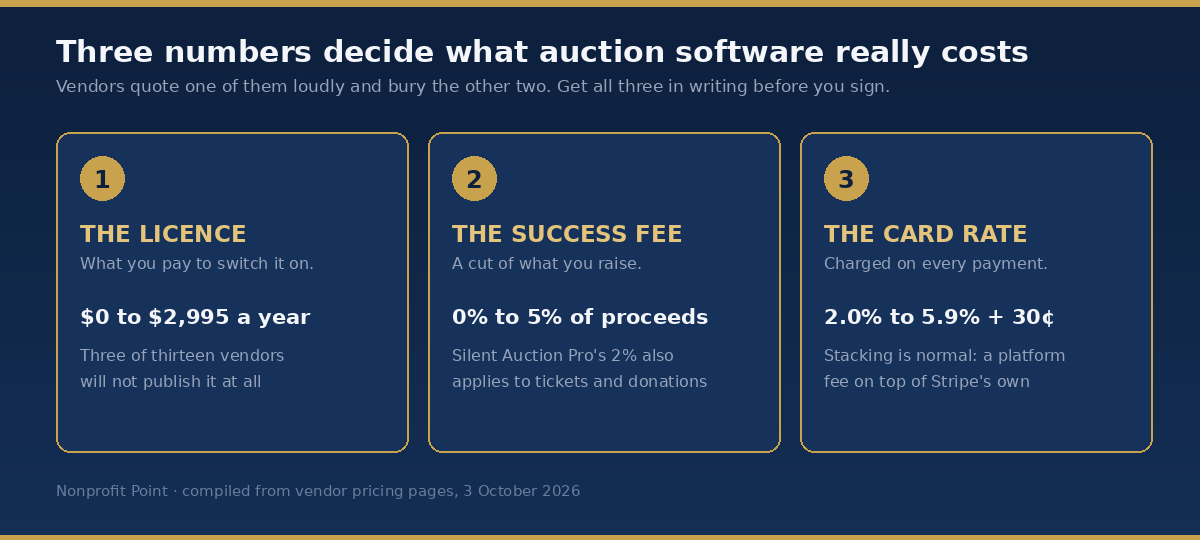
Ask any vendor for “the price” and you will get one of three answers, never all three. You need all three.
1. The licence. What you pay to switch the software on, whether or not you raise a penny. It ranges from $0 (Auctria Explorer, Givebutter, BiddingOwl, CharityAuctions.com) to $2,995 a year for the OneCause Professional Auction & Event package. Handbid, GiveSmart and Greater Giving do not publish a licence price anywhere on their websites.
2. The success fee. A percentage of what you raise, taken on top of the licence. This is the number that quietly costs the most on a successful night. BiddingOwl takes 5% of winning online bids. CharityAuctions.com takes 5%, or 3% if you prepay $499. OneCause takes 5% on its pay-as-you-go plan. Silent Auction Pro takes 2% — but read its section, because the base that 2% applies to is wider than anybody else’s.
3. The card rate. Charged on every single payment. Published rates in this guide run from 2.0% to 5.9% plus 30 cents. The thing to understand is that these rates stack: several platforms charge their own percentage on top of what Stripe or PayPal charges, so the figure on the pricing page is not the figure that leaves your bank.
Auctria is refreshingly explicit about the stack. Its help centre states that “Stripe charges $0.30 + 2.9% per transaction in North America,” that Auctria adds 1% on the free plan, and that the combined cost is therefore “$0.30 + 3.9% per transaction.” Most vendors leave you to work that out yourself. 32auctions tells you plainly that it “adds 2.9% + $0.40 per online payment, on top of whatever Stripe or PayPal charges” — which means a card payment through 32auctions costs you roughly 5.8% plus 70 cents, all in.
What a $25,000 auction actually costs on each platform
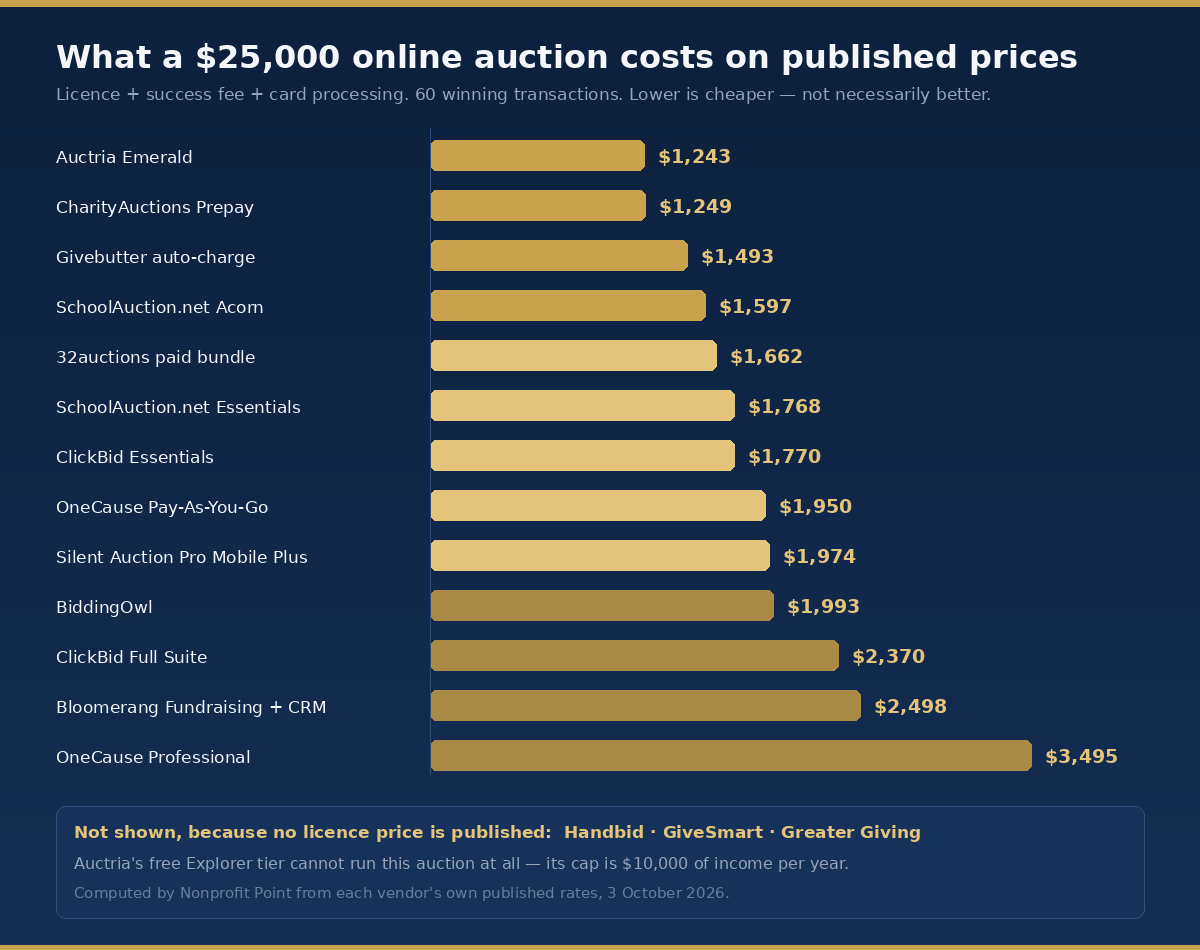
Here is the same auction run on every platform that publishes enough information to compute a total. The assumptions are stated so you can redo the sum for your own event: $25,000 raised online through the platform, 60 winning transactions, one event, one year. Every figure is licence plus success fee plus card processing.
- Auctria Emerald — $1,243. $375 a year plus the combined 3.4% + 30¢ Auctria publishes for that tier.
- CharityAuctions.com Prepay and Save — $1,249. $499 plus a 3% success fee. Card processing is not published, so the real number is higher.
- Givebutter with auto-charge — $1,493. No licence, but a 3% platform fee plus 2.9% + 30¢ processing on every auto-charged winning bid.
- SchoolAuction.net Acorn — $1,597. $79 for the event, plus a 3% performance fee, plus 3% + 30¢ processing.
- 32auctions paid bundle — $1,662. About $170 for the upgrade bundle, plus 32auctions’ own 2.9% + 40¢, plus Stripe’s 2.9% + 30¢ underneath it.
- SchoolAuction.net Essentials — $1,768. $1,000 a year, 3% + 30¢ processing, no performance fee.
- ClickBid Essentials — $1,770. $895 a year plus a flat 3.5%. No ticketing at this tier.
- OneCause Pay-As-You-Go — $1,950. From $200 down, plus the 5% pay-later fee, plus card processing from 2.0%. OneCause says the 5% is capped but does not publish the cap.
- Silent Auction Pro Mobile Plus — $1,974. $749 plus 2% of proceeds plus 2.9% card processing — and possibly far more, for the reason in its section below.
- BiddingOwl — $1,993. No licence, but 5% of winning online bids plus whatever Stripe or PayPal charges, which BiddingOwl does not publish.
- ClickBid Full Suite — $2,370. $1,495 plus 3.5%. This is the tier that includes ticket sales and table management.
- Bloomerang Fundraising plus CRM — $2,498 at minimum. $165 a month is the cheapest bundle that gets you auction capability, plus 2.0% + 30¢. The incremental price of the auction module itself is not published, so this is a floor, not a quote.
- OneCause Professional — $3,495. $2,995 flat, plus card processing from 2.0%, with no percentage of proceeds.
Three things that chart cannot show you. Handbid, GiveSmart and Greater Giving are absent because none of them publishes a licence price. Auctria’s free plan cannot run this auction at all — its ceiling is $10,000 of income a year, so a $25,000 night forces you onto the $375 tier. And a cheaper bar is not a better platform: the two most expensive rows here, OneCause Professional and ClickBid Full Suite, both include things the cheap rows do not.
The free and nearly free tier
This is where most small nonprofits and school PTOs should start, and it is also where the word “free” does the most work. Four of these six are free in a sense that matters; two are free in a sense that does not.
Auctria — the most genuinely free full platform
Auctria’s Explorer plan costs nothing per year and includes unlimited events, unlimited items and online/mobile bidding. The binding limits are $10,000 of total income per year, 250 bidders per event, three team members, and a 1% Auctria credit-card fee on top of Stripe. Texting is not included on the free tier.
Paid tiers are honest and cheap by the standards of this market: Emerald at $375 a year ($50,000 income cap, 750 bidders, 0.5% card fee, 1,000 texts included) and Diamond at $750 a year (unlimited income tracking, 1,000 bidders, 0.25% card fee, 3,000 texts). Extra texts are “$25.00 / 1,000 additional texts.” Assisted setup is a separate purchase — Launch Foundation at “+$499 per event,” Launch Advantage at “+$749 per event” — and one-off support calls are billed at $49.95 for twenty minutes or $99.95 for forty-five.
Best for: a small nonprofit that will stay under $10,000 a year, and the best upgrade path on this list if you outgrow it.
The complaint that recurs: reviewers on Capterra, where Auctria holds a 4.8 average across more than 500 reviews, consistently praise the support and consistently describe the interface as dated and the checkout as unintuitive for first-time volunteers. If your auction committee turns over every year, budget time for training.
32auctions — free if you never run a card through it
32auctions gives you a complete online silent auction for nothing: up to 20 items, one image per item, unlimited bidders, real-time mobile bidding and outbid email notifications, funded by house ads on your auction page. Everything else is an à-la-carte upgrade — more items, four large images per item, ad removal, text notifications, branding, advanced insights, and, crucially, online payment collection. The vendor quotes its bundle at “about $170 per event.”
The number that decides whether 32auctions is cheap: “32auctions adds 2.9% + $0.40 per online payment, on top of whatever Stripe or PayPal charges.” That is roughly 5.8% plus 70 cents all in. The escape hatch is real, though — if you invoice winners and take cash, cheques or your own processor, you pay 32auctions nothing. The vendor is also unusually clear about what it never charges: “No annual contract. No commission on what you raise. No platform fee on donations. No minimums.”
Best for: a PTO or small charity running a purely online auction with twenty items or fewer and collecting money offline. In that exact configuration it is genuinely $0.
What it does not do: ticketing and guest check-in, at all. 32auctions says so itself, framing it as deliberate focus rather than a gap. If you are running a gala, this is not your platform.
The complaint that recurs: its Capterra rating sits around 4.0 — the lowest here — but from only fourteen reviews, which is too thin a sample to lean on. The repeated themes in those reviews are email-only support and payout delays.
Givebutter — free until the moment you charge a winning bidder
Givebutter is the most capable free option in this guide and the one whose pricing most needs reading twice. Auctions are properly built in, with no published limit on items and three bidding modes: standard, automatic max-bid proxy, and blind bidding, where “bidders submit a single, confidential ’best and final’ offer without seeing other bids or pricing.” Ticketing, wallet-based mobile tickets, scan check-in and Tap to Pay are all included.
The headline pricing is “0% platform fees across all campaign types when tips are enabled,” with Givebutter saying 92% of donors cover the fees when asked. Turn the tip prompt off and “a flat 3% platform fee applies” plus 2.9% + 30¢ on cards and 1.9% + 30¢ on ACH.
Here is the part that matters for auctions, in Givebutter’s own words from its help centre: “Auto-charge transactions will incur a 3% platform fee in addition to the 2.9% + $0.30 processing fee.” Auto-charge is the mechanism that bills winning bidders’ saved cards when the auction closes — which is to say, the mechanism nearly every auction uses. That is 5.9% plus 30 cents on every winning bid, and it is the single most consequential number in this guide, because it sits behind a product marketed as free.
We are reporting what Givebutter publishes, and what it publishes is in tension: the pricing page says nonprofits do not pay processing fees when tips are enabled, and the help centre says auto-charge carries 3% plus processing. Before you budget $0 for a Givebutter auction, get a written answer from Givebutter on how the tip-enabled guarantee interacts with auction auto-charge. It is the difference between free and roughly $1,500 on a $25,000 night.
One more thing to check if you are an older account: Givebutter runs two pricing regimes, split by whether the account was created before or after 9 September 2025, and switching from legacy to standard pricing is permanent.
Best for: a small nonprofit that needs auction, ticketing, check-in and card-on-file in one free place and whose board is comfortable with a donor tip prompt.
BiddingOwl — free on paper, 5% online
BiddingOwl’s entire fee schedule is one sentence: “The only time we charge you 5% performance fee is when you actually run an online/mobile auction.” Its own worked example is blunt — “Let’s assume you have an online item that sells for $100. We will charge you $5 based on the winning bid.”
Everything else is free and the list is longer than you would expect: traditional silent and live auctions, bid sheets, ticket sales, donation collection, checkout management, telephone support and 24/7 emergency support. There are no plan tiers, no item caps and no bidder caps.
Two things to be clear-eyed about. The 5% has no published cap, so a $40,000 online auction costs $2,000 — more than any flat-fee platform here. And BiddingOwl publishes no credit-card processing rate of its own; it routes through Stripe or PayPal and leaves those rates to them, which means the 5% is not your total.
Best for: a school or small charity running a paper or in-person silent auction, where the free side of the product is the whole product and real phone support is included.
CharityAuctions.com — zero upfront, 5% of everything
Note the name first: the platform formerly at charityauctionstoday.com now redirects to charityauctions.com, so older bookmarks and older articles are pointing at a rebrand.
Two plans, both published. Nothing Out of Pocket is a 5% success fee with no upfront cost, and the vendor itself scopes it to “events raising $1K to $24K.” Prepay and Save is $499 plus a 3% success fee, scoped to “events raising $25K+.” Both include the full module list — online auction, donation button, ticket sales, attendee management, paddle raise, fund-a-need, raffle items, sponsor logos, leaderboards, live event kiosk with QR check-in, and golf outing management — with email and SMS blasts reserved for the paid plan.
Credit-card processing is not published on either plan. Treat the 5% and the 3% as partial numbers.
Best for: an organisation that wants a complete feature set with no upfront risk and would rather pay a percentage than a fee. The crossover the vendor itself draws — below about $25,000 take the 5%, above it take the $499 — checks out arithmetically.
SchoolAuction.net — the cheapest paid entry point
There is no free tier, but Acorn is $79 per event at nonprofit rates with unlimited items and unlimited bidders, which no other sub-$100 option offers. The catch is a 3% performance fee on top of 3% + 30¢ processing, one event site, and six months of access.
Step up and the performance fee disappears: Essentials $1,000/year (three event sites, one year of access), Plus $1,500/year and Professional $2,000/year (both unlimited sites, and both let you bring your own card processor). Corporate rates run roughly double across the board.
Best for: a school PTO running one auction a year. It is also the only vendor here specialising in school auctions for two decades.
The complaint that recurs: setup complexity, vividly — one Capterra reviewer wrote that entering a single beverage option meant filling out twenty boxes. The useful pattern in those reviews is that complaints cluster among users with under six months of experience while multi-year customers are consistently positive. For a PTO with annual volunteer turnover, that first year is the whole relationship.
The paid platforms
These are the tools built for a ballroom: ticketing, seating, express check-in, card on file, a live auction and a fund-a-need in the same system. They cost between roughly $900 and $3,000 a year where they tell you, and an unknown amount where they do not.
ClickBid — the only complete published price list
ClickBid is the one vendor here you can budget for without speaking to anyone. Essentials is $895 USD/year and Full Suite is $1,495 USD/year, both carrying a flat 3.5% fee on credit card transactions. Canadian pricing is $1,195 and $1,895 CAD with a 3.59% card fee. A Dedicated Customer Advisor is an optional add-on at “$100 USD / $135 CAD / hour.”
Read the tier split carefully, because it is the trap: online ticket sales and table and guest management are in Full Suite only. If your event sells tickets — and a gala does — your price is $1,495, not $895.
The page is unusually direct about what it does not charge: “No hidden ’per-event’ fees,” “No donor tip requests,” “No extra charge for CRM integrations.” Event-night phone support is included rather than upsold, which sets it apart from most of this list. There is also a published referral reward: “Refer a nonprofit to ClickBid and get a $100 reward.”
Best for: small and midsize nonprofits running one or a few galas a year on a defined budget, who value a known number and a human on the phone on the night over a modern interface.
The complaint that recurs: the interface. Capterra reviewers at a 4.6 average praise the support almost universally and describe the software itself as dated and limited in customisation, with “a lot of manual work to build a landing page.”
Silent Auction Pro — cheap licence, unusually broad success fee
Four annual packages, all published: Bidsheet Plus at $449, Bidsheet Pro at $649, Mobile Plus at $749 and Mobile Pro at $899 — each “+ 2.0% of event proceeds.”
That 2% deserves a close reading, because the base is wider than anyone else’s here. The vendor states it applies to “all auction proceeds including auctioned items, ticket sales, additional donations, fund-a-need donations, etc.” Most competitors take their percentage on auction items only. Silent Auction Pro takes it on your ticket revenue and your straight donations too. It is capped at $3,500 for any single event.
Card processing is quoted as “a flat 2.9% with no per transaction fees” — and then, immediately below, the pricing page carries this sentence: “Beginning Jan 1, 2023 – credit card payments will incure an additional 3% credit card processing surcharge.” We are quoting it exactly as published, typo included. It is still written in the future tense about a date more than three years past, and it does not say who bears the 3% — your organisation or the payer. As published, you cannot tell whether card processing costs 2.9% or close to 5.9%, and on a $25,000 auction that ambiguity is worth $750. Ask before you sign.
Other published charges: $100 to import contact data, $49/year for pre-paid hosting, $12 per card reader rental, a 30-day money-back guarantee and a $99 cancellation fee after it.
Best for: an established in-person gala with a volunteer committee running the same event annually, especially on the paper Bidsheet tiers.
OneCause — the biggest name, now part of Bonterra
OneCause publishes two anchor prices and quotes the rest. The flat option is the $2,995 Professional Auction & Event package. The alternative is pay-as-you-go “starting at just $200,” where “a 5% pay later fee is applied to funds raised” — and OneCause claims to be “the only provider in the industry that caps this fee,” without publishing the cap. Its own pay-as-you-go page says “as little as $500 down” and scopes the model to organisations raising $50,000 or less a year, which does not quite match the $200 on the plans page.
Card processing is “starting at 2.0%”, through Stripe or Deluxe, with no per-transaction cents figure published. Enterprise and Nationals tiers are quote-only.
Feature coverage is the broadest here: integrated ticketing, table management, express check-in, raffles, paddles, a spotter tool, fund-a-need appeals, personal fundraising pages and text messaging, across all tiers. OneCause states “Over $8 Billion Raised” with “14K Organizations” on its plans page — though a different OneCause page still says “more than $6.5 billion,” so treat the vendor’s own totals as approximate.
One thing to weigh before signing a multi-year deal: OneCause was acquired by Bonterra, announced 15 October 2025, and every page now carries the “joined forces with Bonterra” banner. Acquisitions reshape roadmaps and renewal pricing.
The complaint that recurs: across 388 Capterra reviews at a 4.7 average, the loudest and most repeated theme is not reliability but data migration — supporters not carrying over to the newer platform and no batch upload to fix it. One reviewer: “No supporter upload!! (Like on the old platform) This is a HUGE negative for us.” If you are coming from the legacy product, ask about migration in writing.
Handbid — rates published, licence not
Handbid publishes its card rates to the cent and its licence to nobody. Processing is 3.5% + $0.30 on Visa, Mastercard and Discover, 3.95% + $0.30 on American Express, and 1.5% flat on ACH. Critically, “there is no platform percentage on top of the card rates” — Handbid does not take a cut of what you raise. Licensing is by the term rather than the event, a one-year licence is standard, and the price arrives after a conversation.
Two operational details worth knowing. Night-of phone support is included in every licence, not upsold: “A live person on the phone during your event. Every license, no upsell.” And if you let Handbid process payouts rather than connecting your own account, “payouts generally take up to three weeks after you close invoices and sign the settlement report” — plan your cash flow accordingly, or connect your own payout account before you go live.
Handbid also offers a checkout prompt asking bidders to cover processing, and reports take-up “north of 80%” where organisations use it.
Best for: galas that want a concierge, done-for-you setup and a native bidding app, and that can absorb the highest published card rate here.
The complaint that recurs: across a smaller review base, contract and line-item surprises — features reviewers understood to be included later billed as extras — and slow support replies outside event night. Note too that review-site listings for Handbid still show retired legacy packages and item caps that Handbid’s own site now contradicts.
GiveSmart — nothing published at all
GiveSmart offers two models and no numbers. The Annual Fee Subscription is “Ideal for established nonprofits with consistent fundraising volume who want fixed, predictable platform costs,” with a “Fixed annual subscription fee. No per-transaction fees.” Pay-As-You-Go has “No annual upfront subscription fee. A clearly disclosed transaction rate applies when payments are processed,” and the rate is “disclosed at signup and in your agreement.”
No dollar figure and no percentage appears anywhere on the plans page. Review sites list a starting price around $3,000 a year, but that is a review-site figure, not a GiveSmart one, and we are not presenting it as a price.
The product itself is strong for complex events: self check-in and self check-out, seating management, one electronic receipt covering donations, paddle raise, auctions and add-ons, plus raffle tickets and merchandise as ticketing extras. GiveSmart says its customers have raised “$14+ billion,” though a GiveSmart blog page still says $5.7 billion.
Watch for stale pages. The site’s footer still reads 2025, the mobile bidding page cites 2021 statistics as current, and the navigation promotes a 2025 trends study. That does not make the software bad; it does mean you should verify anything you read there against a human.
The complaint that recurs: annual price escalation, more than any other theme. “The price for the same service seems to go up considerably each year” is a representative Capterra line. If you sign, ask what renewal looks like in year two and get it in writing.
Greater Giving — no pricing page exists
Greater Giving publishes three packages — Express Package, Event Package, and Event Package with Online Bidding — and not a single dollar figure or percentage anywhere on the comparison page. Its /pricing URL returns a 404. Everything routes to a demo request.
What it does publish is a genuine strength: every package includes “Easy check-in and check-out with Go Time” and “PCI Level-1 compliant credit card storage & merchant processing,” with credit-card pre-registration on the Express and Event tiers. If your gala’s actual pain is a forty-minute queue at the check-out table, this is the product built around solving that. Online bidding, note, is only in the third package.
Greater Giving states 10,000+ nonprofits and schools, 90,000+ events and $9 billion+ processed. Third-party sites report package prices in the $795 to $1,995 range plus around 4% processing, but those figures come from reader comments on a 2023 article and we are not treating them as vendor pricing.
The complaint that recurs: dated interface rather than unreliability — “Building a event is somewhat clunky and not very intuitive” is typical of its 4.4 Capterra average, the lowest of the paid platforms here.
Bloomerang — auctions only come bundled
Qgiv is now Bloomerang; qgiv.com redirects to Bloomerang pages and the auction product is marketed as Bloomerang Auction Software inside Bloomerang Fundraising. Published prices: Bloomerang Fundraising from $40/month billed annually, Bloomerang CRM from $125/month, Bloomerang Volunteer from $119/month, and the full Giving Platform from $242/month.
The asterisk is the whole story. Bloomerang Fundraising — the product that holds auctions — carries the footnote “Must be purchased as part of bundle with Bloomerang CRM.” You cannot buy it alone. The realistic floor for a gala-only buyer is $40 + $125 = $165 a month, or $1,980 a year, and auctions are presented as an upsell on top of that with no separate price published. Bloomerang’s own blog puts its payment processing at 2.0% + $0.30, though the pricing page itself publishes no rate.
Feature coverage is good: QR check-in, table seating, multi-guest ticketing, fund-a-need appeals, in-app raffle ticket sales, Tap to Pay and real-time outbid alerts by text, email and push.
Best for: an organisation replacing a donor database and an auction tool at the same time. For a gala-only buyer with no CRM need, it is the worst-value structure in this guide.
The complaint that recurs, and it is specific to event nights: Capterra reviewers report “No customer support during the event,” with no assistance outside business hours Monday to Friday. ClickBid, Handbid and OneCause all advertise day-of support. If your auction closes at 9pm on a Saturday, this is the difference that matters most.
Three vendors will not tell you the price
Handbid, GiveSmart and Greater Giving publish no licence cost. GiveSmart and Greater Giving publish no card rate either. This is normal in nonprofit software and it is worth naming for what it does to you as a buyer: it means you cannot compare before you are in a sales conversation, and it means the price you are quoted is a function of how you negotiate rather than a published rate everyone pays.
If you go into those conversations, go in with a written list and do not leave without answers to all of it: the annual licence; whether ticketing is included or a separate tier; the exact card rate by card type, including the per-transaction cents; whether any percentage of proceeds is taken and whether it is capped; what renewal pricing looks like in year two; whether event-night support is included; and how long payouts take after the event closes.
Every one of those is a number some vendor in this guide publishes and another hides. None of them is rude to ask.
What the benchmark data says, and where it contradicts itself
Auction software marketing leans hard on benchmark statistics. Two of them are worth knowing, and the fact that they disagree is worth knowing more.
OneCause published a State of Nonprofit Auctions Report on 23 April 2025, billed as the sector’s first. Its headline figures: an average auction gift of $529, and “the average auction contains 67 items, which raise 134.5% of their value.” On sentiment, “77% of nonprofit professionals reported consistent or increased revenue from auctions, with 90% of respondents expecting this trend to continue in the next year,” while “83% of auction attendees indicated they would return for future events from the same organization, and 64% expressed interest in becoming monthly donors.”
Set against that, a Greater Giving post on auction maths states that live auction items yield 75% of their actual value and silent auction items yield 50% — and that live auctions typically generate 66% of auction income with silent auctions making up the other 34%. It also suggests a floor of 150 to 200 guests for most events.
So one vendor says auctions raise 134.5% of item value and another says 50 to 75%. Neither publishes a sample size or a methodology, and neither is independently audited. The OneCause release describes its inputs only as “feedback from auction donors, nonprofit professionals who host auctions, and real-time data from the OneCause Fundraising Platform.” Use both as directional colour, not as a planning assumption.
One more thing, said plainly because every other guide fudges it: there is no credible published benchmark for revenue per attendee at a nonprofit auction. We looked. If you see one quoted, ask who measured it and across how many events.
Honest planning numbers come from your own last three events, not from a vendor’s survey. If you are still assembling the lot list that drives those numbers, our guide to silent auction item ideas is a better starting point than any benchmark.
The paperwork your auction software will not do for you
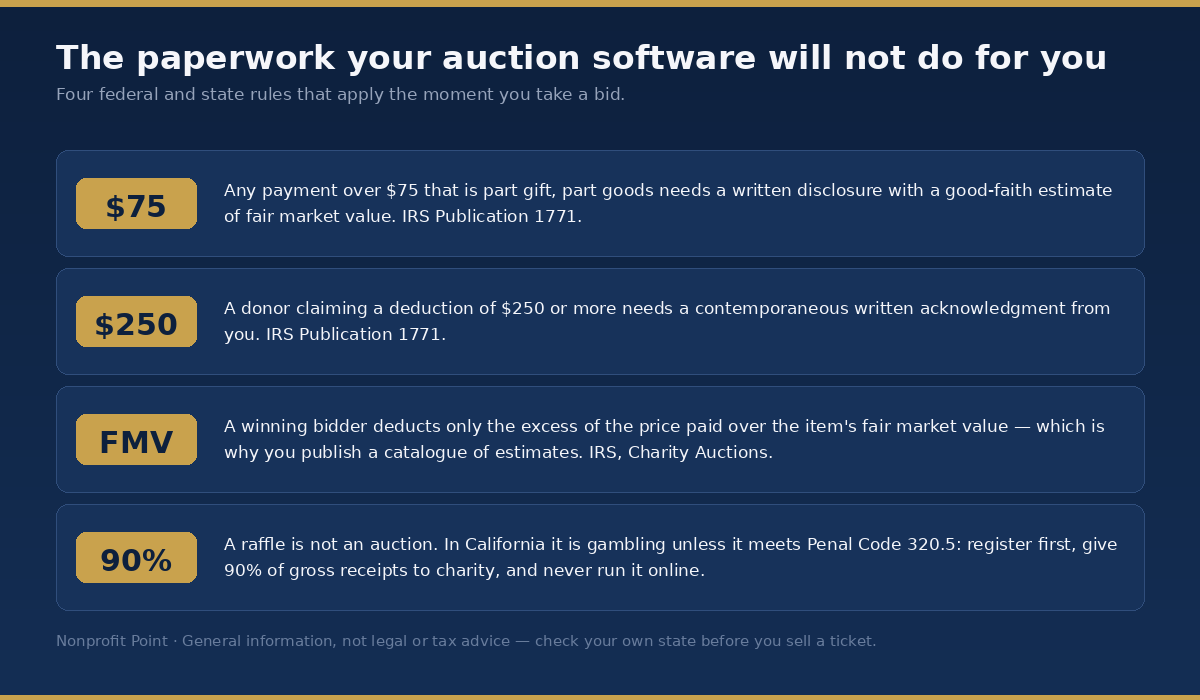
No platform in this guide files your paperwork. Four rules apply the moment you take a bid, and the first two carry penalties.
The $75 quid pro quo disclosure. IRS Publication 1771 is explicit: “An organization must provide a written disclosure statement to a donor who makes a payment exceeding $75 partly as a contribution and partly for goods and services provided by the organization.” That statement must “provide the donor with a good faith estimate of the fair market value of the goods or services.” Nearly every winning auction bid over $75 is exactly this kind of payment. The penalty for getting it wrong is “$10 per contribution, not to exceed $5,000 per fundraising event or mailing.”
The $250 acknowledgment. Also Publication 1771: “A donor cannot claim a federal income tax deduction for any single contribution valued at $250 or more unless the donor obtains a contemporaneous written acknowledgment of the contribution from the donee charitable organization.”
How much a winning bidder can actually deduct. The IRS page on charity auctions states that “donors who purchase items at a charity auction may claim a charitable contribution deduction for the excess of the purchase price paid for an item over its fair market value.” This is why the catalogue matters: the IRS explicitly sanctions the mechanism, noting that “a charity may publish a catalog, given to each person who attends an auction, providing a good faith estimate of items that will be available for bidding.” Publish your estimates, and your bidders know what they can claim.
The trap on donated items. If a supporter donates tangible personal property for you to auction, the same IRS page warns that where the property is put to an unrelated use, “the donor’s contribution is limited to the donor’s tax basis in the contributed property” — and then adds the sentence that catches people out: “The sale of an item is considered unrelated, even if the sale raises money for the charity to use in its programs.” A donor giving you a painting worth $5,000 that they bought for $500 generally deducts $500, not $5,000. Tell them before they donate, not after.
This is general information rather than tax advice, and your own counsel should see anything unusual. But a platform’s feature list is no substitute for any of it.
A raffle is not an auction, and the difference can be illegal
Most of the platforms in this guide advertise raffle tickets as a feature. OneCause, GiveSmart, Bloomerang, ClickBid and CharityAuctions.com all list raffles; Handbid, Auctria and Greater Giving do not name raffles as a distinct feature at all. Having the button does not make running one lawful where you are.
Federally, the split is clean. IRS Publication 526 lists among contributions you cannot deduct: “Costs of raffles, bingo, lottery, etc. You can’t deduct as a charitable contribution amounts you pay to buy raffle or lottery tickets or to play bingo or other games of chance.” An auction bid can carry a deductible excess over fair market value. A raffle ticket carries nothing. Raffles also trigger gambling reporting — Form W-2G where winnings are at least 300 times the wager, and 24% federal withholding where winnings minus the wager exceed $5,000.
At state level it gets sharper. California’s Attorney General states that “a raffle is defined as gambling unless it meets all of the criteria set forth in Penal Code section 320.5.” You must register and hold a confirmation letter “prior to conducting any raffle activities. This includes selling tickets to an event that will be held in the future.” At least 90% of gross receipts must go to charitable purposes. And the one that collides directly with your software: “Operating or conducting a raffle via the Internet is also prohibited. However, the organization conducting the raffle may advertise the raffle on the Internet.”
Read that against an online auction platform with a raffle module and the problem is obvious. Washington State requires a licence once an organisation exceeds two public raffles a year or $5,000 in gross receipts from unlicensed public raffles. Every state is different. Check yours before you enable the feature, not after you sell the first ticket. If a raffle is the right call for your event, our raffle basket ideas guide covers the prize side.
The Stripe nonprofit discount trap
Most of these platforms process through Stripe, whose published standard rate is 2.9% + 30¢. Stripe does offer a nonprofit fee discount, and plenty of nonprofits assume they will get it.
Read the eligibility test before you budget on it. Stripe requires that “at least 80% of your Stripe payment volume comes from tax-deductible donations” — and its own list of what does not count toward that 80% includes membership fees, tuition payments, registration fees, ticket sales and, explicitly, auction payments.
An auction-heavy nonprofit can therefore fail Stripe’s nonprofit test on precisely the revenue its auction software processes. Stripe does not publish the discounted rate on that page either; you have to ask. Budget at the standard rate and treat any discount as upside.
How to shortlist in one afternoon
Six steps, in order, and you can finish them between lunch and dinner.
- Write down what you actually raised last year at this event, and how many winning transactions it took. Those two numbers drive everything below. Without them you are shopping on adjectives.
- Decide whether you need ticketing. This single answer eliminates half the market. 32auctions has no ticketing at all. ClickBid puts it behind the $1,495 tier. Givebutter, Auctria, CharityAuctions.com and all the paid platforms include it.
- Do the three-number sum for your real figure. Licence, plus success fee on your actual total, plus card rate on your actual transaction count. The $25,000 chart above is a worked example, not your answer — a $6,000 auction and a $120,000 auction rank these platforms in completely different orders.
- Ask about event-night support explicitly. ClickBid, Handbid and OneCause advertise day-of phone support. Bloomerang reviewers report none. If your event is on a Saturday evening, this is worth more than any feature.
- Ask when the money arrives. Handbid says payouts can take up to three weeks if it processes on your behalf. If you have a bill due the following week, ask every shortlisted vendor this question in writing.
- Run a test auction with three real items before you commit, on every platform with a free tier or a trial. Have a volunteer who has never seen the software try to bid and check out on a phone. That fifteen-minute test predicts your event night better than any review score.
If the auction is one piece of a bigger evening, our walkthrough on how to host a charity gala covers the run of show around it. And if you are evaluating this alongside your wider fundraising stack, we have done the same fee arithmetic for donation platforms, peer-to-peer fundraising software, nonprofit CRMs and nonprofit accounting software. The head-to-head on Donorbox versus Givebutter goes deeper on the tip-prompt model that makes Givebutter free.
Frequently asked questions
What is the cheapest nonprofit auction software?
Auctria’s free Explorer plan is the cheapest full-featured option at $0 a year, including unlimited items, online bidding, ticketing and check-in. Its limits are $10,000 of income per year and 250 bidders per event. If you have twenty items or fewer and will collect payment offline by cash or cheque, 32auctions is free with no income cap, because you only pay 32auctions when a card is processed through it.
Is Givebutter really free for auctions?
Not in the way most organisations assume. Givebutter’s platform fee is 0% when donor tips are enabled, but its own help centre states that auto-charge transactions — the mechanism that bills winning bidders when an auction closes — “will incur a 3% platform fee in addition to the 2.9% + $0.30 processing fee.” That is 5.9% plus 30 cents on winning bids. Get Givebutter’s written answer on how its tip-enabled guarantee interacts with auction auto-charge before you budget zero.
How much does OneCause cost?
OneCause publishes two anchor prices: a $2,995 Professional Auction & Event package billed annually, or pay-as-you-go starting at $200 where “a 5% pay later fee is applied to funds raised.” OneCause says that 5% is capped but does not publish the cap. Card processing starts at 2.0%. Enterprise and Nationals tiers are quote-only.
Which auction platforms publish their full pricing?
Only three publish a complete picture of licence and card rate: ClickBid, Auctria and SchoolAuction.net. Silent Auction Pro and CharityAuctions.com publish licence and success fee but leave processing partly unclear. OneCause and Bloomerang publish anchor prices with gaps. Handbid publishes card rates but not its licence. GiveSmart and Greater Giving publish nothing at all.
What is a success fee and which platforms charge one?
A success fee is a percentage of what you raise, charged on top of any licence. BiddingOwl takes 5% of winning online bids with no published cap. CharityAuctions.com takes 5%, or 3% if you prepay $499. OneCause takes 5% on pay-as-you-go. SchoolAuction.net’s Acorn plan takes 3%. Silent Auction Pro takes 2%, applied to ticket sales and donations as well as auction items, capped at $3,500 per event. ClickBid, Handbid and Auctria charge no percentage of proceeds.
Do I need separate software for ticketing and check-in?
Not usually, but check the tier. 32auctions has no ticketing or check-in at all. ClickBid includes ticketing only in its $1,495 Full Suite, not in the $895 Essentials plan. Givebutter, Auctria, CharityAuctions.com, OneCause, GiveSmart, Greater Giving, Handbid, Silent Auction Pro and Bloomerang all include ticketing and check-in, though the depth of seating and table management varies a great deal.
How much of a winning auction bid is tax deductible?
Only the amount paid above the item’s fair market value. The IRS states that donors at a charity auction “may claim a charitable contribution deduction for the excess of the purchase price paid for an item over its fair market value.” A $600 bid on a package worth $400 yields a $200 deductible amount. Publishing a catalogue with good-faith estimates is the method the IRS itself describes for establishing those values.
Does my nonprofit have to send a receipt for auction purchases?
Yes, in most cases. IRS Publication 1771 requires a written disclosure statement for any payment over $75 that is partly a contribution and partly for goods or services, and that statement must include a good-faith estimate of fair market value. Separately, a donor claiming $250 or more needs a contemporaneous written acknowledgment. The penalty for missing disclosures is $10 per contribution, up to $5,000 per event.
Can I run a raffle through my auction software?
Only if your state allows it in the form the software offers. Raffles are regulated gambling in many states. California treats a raffle as gambling unless it satisfies Penal Code section 320.5, requires registration and a confirmation letter before any tickets are sold, requires at least 90% of gross receipts to go to charitable purposes, and prohibits operating a raffle over the internet entirely. Raffle ticket purchases are also never tax deductible, unlike auction bids.
Why do card processing rates differ so much between platforms?
Because many platforms add their own percentage on top of the underlying processor. Auctria publishes the stack openly: Stripe’s 2.9% + 30¢ plus Auctria’s own 0.25% to 1%, depending on plan. 32auctions states it “adds 2.9% + $0.40 per online payment, on top of whatever Stripe or PayPal charges,” roughly doubling the cost. Handbid and ClickBid charge a single all-in rate of around 3.5% with no platform cut of proceeds. Always ask whether a quoted rate is the total or just the vendor’s layer.
How we put this guide together
Every price, rate and limit in this guide was read directly from the vendor’s own pricing page, help centre or fee schedule on 3 October 2026, and quoted rather than paraphrased wherever the exact wording matters. Where a vendor publishes nothing, we say so instead of repeating a figure from a review site or a competitor’s comparison page.
Review-site ratings and recurring complaints are attributed as such and kept separate from vendor claims. We flagged the places where a vendor’s own pages disagree with each other, and the places where a published sentence is ambiguous enough to cost you real money. The $25,000 worked example is our arithmetic on published rates, with the assumptions stated so you can redo it against your own numbers.
Nonprofit Point has no commercial relationship with any platform named here, and no vendor paid for or reviewed this guide. Pricing in this market changes without announcement — several pages we read still carry 2023 and 2025 dates — so confirm the current rate with the vendor before you sign anything. This article is general information, not legal, tax or financial advice.
Last verified against vendor pricing pages on 3 October 2026.